<?xml version="1.0" encoding="utf-8"?><feed xmlns="http://www.w3.org/2005/Atom" ><generator uri="https://jekyllrb.com/" version="3.10.0">Jekyll</generator><link href="/feed.xml" rel="self" type="application/atom+xml" /><link href="/" rel="alternate" type="text/html" /><updated>2026-03-30T19:26:59+00:00</updated><id>/feed.xml</id><title type="html">Tom White</title><subtitle>Problems worthy of attack prove their worth by hitting back — Piet Hein</subtitle><entry><title type="html">Very Slow Movie Player</title><link href="/2024/06/very-slow-movie-player.html" rel="alternate" type="text/html" title="Very Slow Movie Player" /><published>2024-06-15T00:00:00+00:00</published><updated>2024-06-15T00:00:00+00:00</updated><id>/2024/06/very-slow-movie-player</id><content type="html" xml:base="/2024/06/very-slow-movie-player.html"><![CDATA[<p>I first came across the Very Slow Movie Player on <a href="http://matpalm.com/blog/dithernet_vsmp/">Mat Kelcey’s blog</a> in 2020, who was inspired by <a href="https://bryan.medium.com/very-slow-movie-player-499f76c48b62">the original by Bryan Boyer</a>. The concept is simple: play a movie very slowly on a small e-ink screen by advancing 24 frames per hour, rather than 24 frames per second. How would “watching” a movie like this change the way you think about it?</p>

<p><img alt="Very Slow Movie Player" src="/assets/2024-06-15-vsmp.jpg" width="400" /></p>

<p>I added it to my “interesting things to
make” list, but didn’t get round to buying the e-ink screen until November 2022,
intending to build it over the Christmas holiday. That didn’t happen, but I
finally got round to building it earlier this year.</p>

<p>When I started looking at how to actually build it I discovered that Tom Whitwell
(not to be confused with me, and better known for
<a href="https://medium.com/magnetic/52-things-i-learned-in-2023-a3bbb9f9323d">“52 things I learned in …”</a>, and <a href="https://www.musicthing.co.uk/">Music Thing Modular</a>) had written an
implementation of Very Slow Movie Player that he open sourced at
<a href="https://github.com/TomWhitwell/SlowMovie">https://github.com/TomWhitwell/SlowMovie</a>.</p>

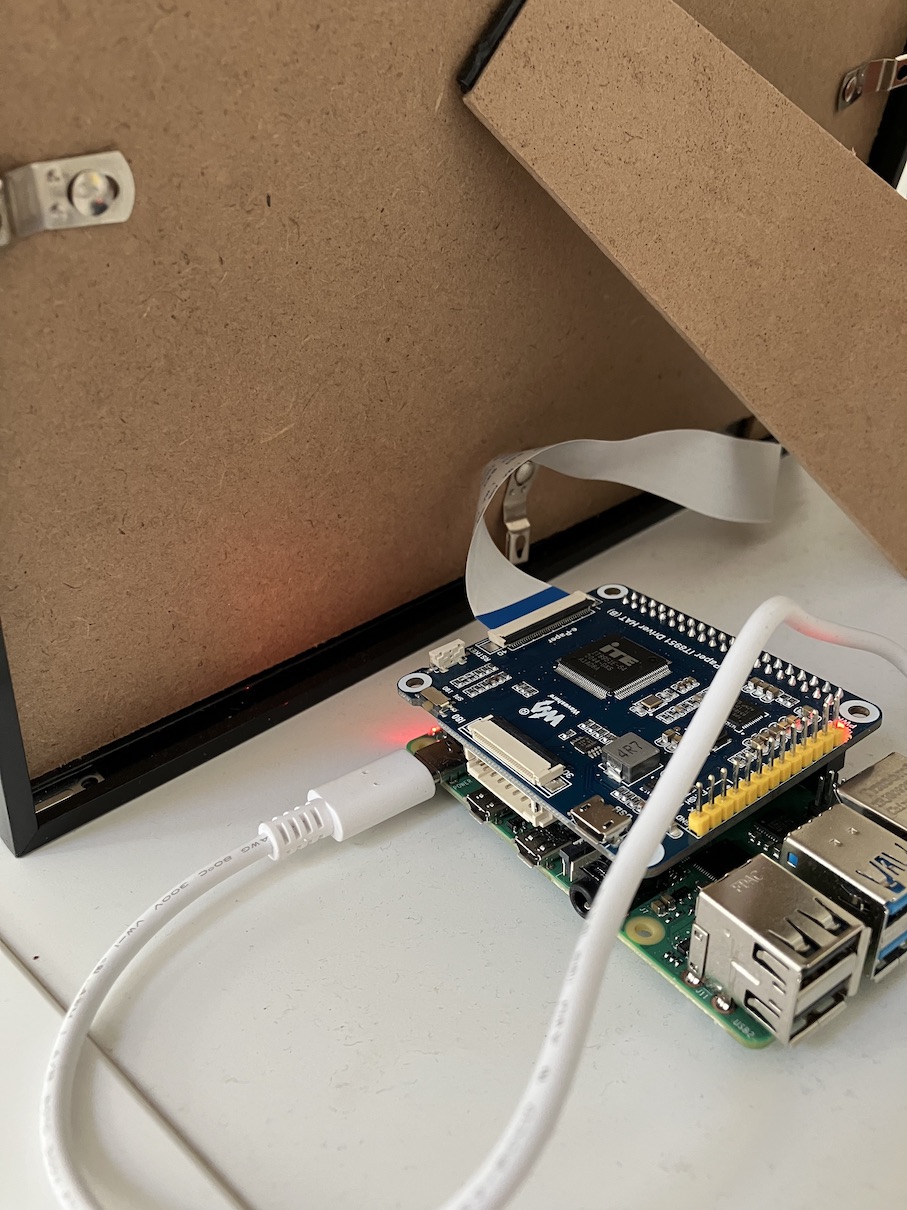
<p>The code is well maintained by a team of folks, and has very clear and comprehensive installation instructions. This made it very easy - I just had to install the code on a Raspberry Pi and configure it for the display I had bought. I managed to mount the display in a picture frame I had lying around, and just propped the Pi behind it.</p>

<p><img alt="The back of Very Slow Movie Player showing a picture frame, and a Raspberry Pi" src="/assets/2024-06-15-vsmp-back.jpg" width="400" /></p>

<p>The default settings update the display by four frames every two minutes. This is faster than the original which advanced 24 frames per hour, but means that most films will “only” take a couple of months to play.</p>

<h2 id="debugging-display-crashes">Debugging display crashes</h2>

<p>After running the VSMP for a few days I noticed that the display would sometimes get stuck and not refresh at all. This normally happened overnight: when we got up in the morning it didn’t seem to have changed <em>at all</em>. I knew it was slow, but this was ridiculous!</p>

<p>Looking at the <code class="language-plaintext highlighter-rouge">systemd</code> log messages I found that the error was “Timed out waiting for display to respond”. I found a <a href="https://github.com/GregDMeyer/IT8951/issues/54">couple</a> of <a href="https://github.com/GregDMeyer/IT8951/issues/56">issues</a> that described the same problem, but with no obvious fix.</p>

<p>The <a href="https://github.com/GregDMeyer/IT8951">notes for the driver</a> said that changing <code class="language-plaintext highlighter-rouge">VCOM</code> and <code class="language-plaintext highlighter-rouge">spi_hz</code> values might help with performance, so I tried changing these, but this didn’t make any difference.</p>

<p>I had also <a href="https://github.com/TomWhitwell/SlowMovie?tab=readme-ov-file#e-ink-display-customization">configured the display</a> to flip the picture vertically and horizontally, because of the way I had oriented the display in the frame. Perhaps that was causing the processor to struggle? Nope - changing it to not do any extra processing didn’t make a difference either.</p>

<p>Running <code class="language-plaintext highlighter-rouge">top</code> showed that <code class="language-plaintext highlighter-rouge">lightdm</code> (the desktop display manager) was using about one third of the CPU. Perhaps that was slowing things down and booting the Pi to the console to avoid running a desktop would help? Nope. It still crashed once or twice a day.</p>

<p>Restarting the process manually had always fixed the problem - there was no need to reboot the Pi - so perhaps just <a href="https://ma.ttias.be/auto-restart-crashed-service-systemd/">getting <code class="language-plaintext highlighter-rouge">systemd</code> to restart</a> it for me would fix it? Not the nicest fix, but it worked, and it’s been running for a couple of months now. This is the service file I ended up with:</p>

<div class="language-shell highlighter-rouge"><div class="highlight"><pre class="highlight"><code><span class="nv">$ </span><span class="nb">cat</span> /etc/systemd/system/slowmovie.service
<span class="o">[</span>Unit]
<span class="nv">Description</span><span class="o">=</span>Slow Movie Player Service

<span class="nv">StartLimitIntervalSec</span><span class="o">=</span>500
<span class="nv">StartLimitBurst</span><span class="o">=</span>5

<span class="o">[</span>Service]
<span class="nv">User</span><span class="o">=</span>tom
<span class="nv">WorkingDirectory</span><span class="o">=</span>/home/tom/SlowMovie
<span class="nv">ExecStart</span><span class="o">=</span>/home/tom/SlowMovie/.venv/bin/python3 /home/tom/SlowMovie/slowmovie.py
<span class="nv">StandardOutput</span><span class="o">=</span>null
<span class="nv">StandardError</span><span class="o">=</span>journal

<span class="nv">Restart</span><span class="o">=</span>on-failure
<span class="nv">RestartSec</span><span class="o">=</span>30s

<span class="o">[</span>Install]
<span class="nv">WantedBy</span><span class="o">=</span>multi-user.target
</code></pre></div></div>

<h2 id="living-with-very-slow-movies">Living with Very Slow Movies</h2>

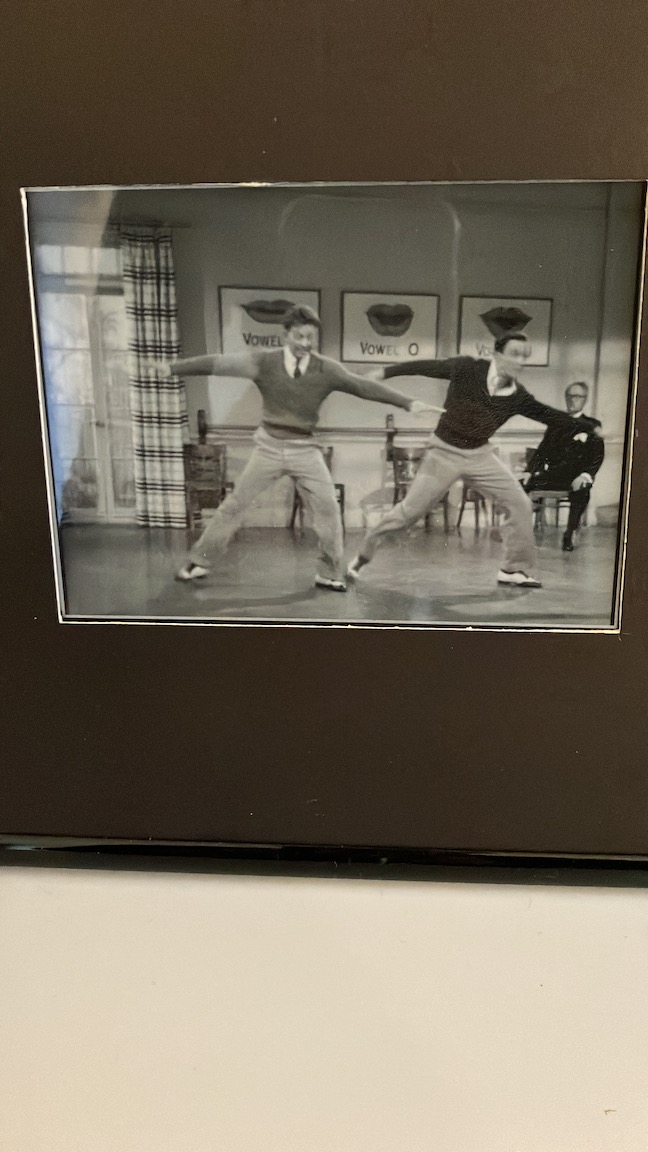
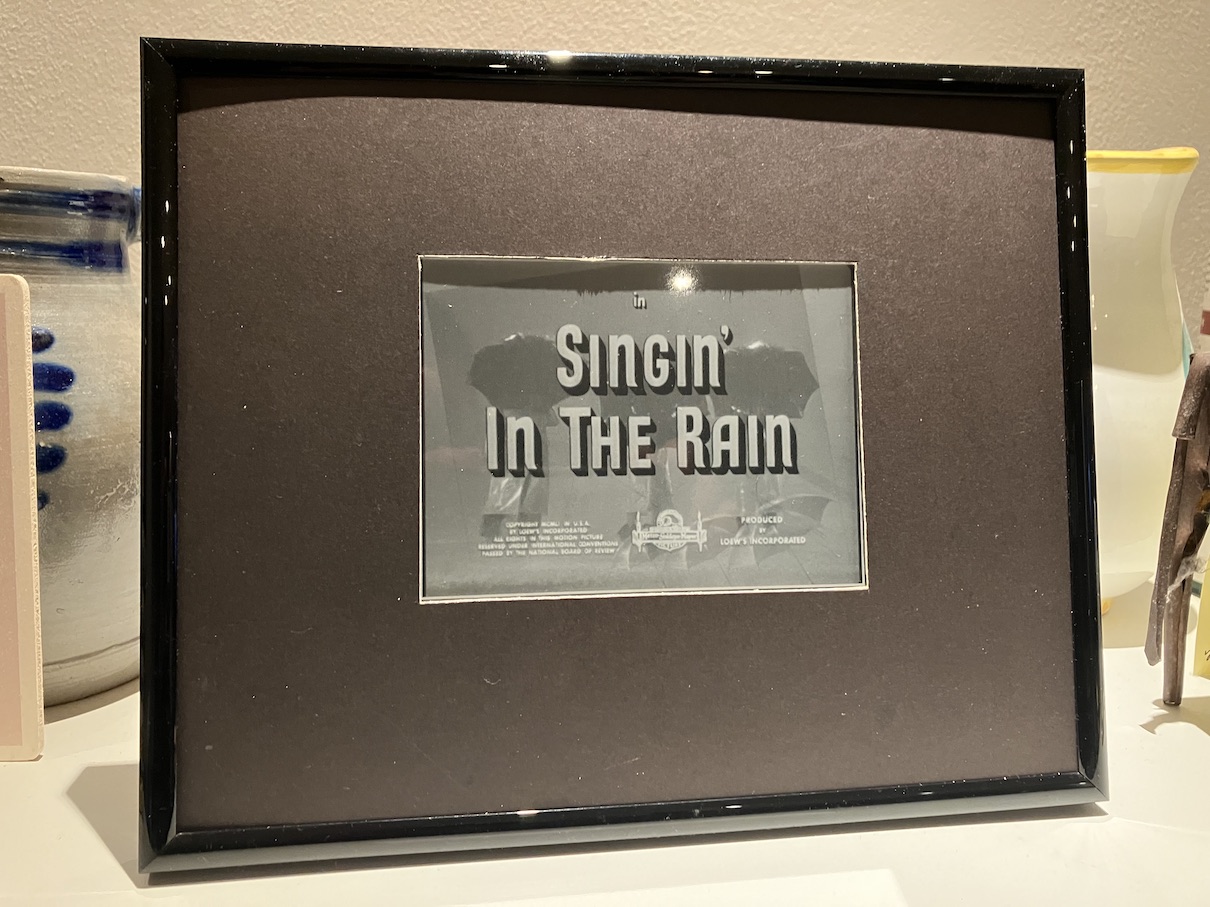
<p>When I put the player in the kitchen, my family were intrigued. It quickly became something we would check to see where we were in the film (<a href="https://www.themoviedb.org/movie/872-singin-in-the-rain?language=en-GB">Singin’ in the Rain</a>), and when Lottie had to go back to uni, she said she was sad that she wouldn’t get to see the whole film. (I would send occasional photos of it to the family group chat.)</p>

<p><img alt="A scene from Singin' in the Rain displayed on a Very Slow Movie Player" src="/assets/2024-06-15-singin.jpg" width="400" /></p>

<p>What makes a good film for a VSMP? One that you know well, with strong visuals and memorable scenes. Musicals are ideal - we love musicals in this family - which is why we started with Singin’ in the Rain. Ours is currently playing <a href="https://www.themoviedb.org/movie/289-casablanca?language=en-GB">Casablanca</a>, which we re-watched recently at normal speed to remind ourselves of the plot.</p>

<p>The display I bought has support for “partial refresh”, which means it can refresh the display without it going through a full refresh cycle, where the screen turns white, then black, before displaying the new frame. (If you’ve got an e-ink screen, such as a Kindle, you will be familiar with this phenomenon.) I had hoped to use partial refresh, but <a href="https://github.com/TomWhitwell/SlowMovie/issues/130">SlowMovie doesn’t support it</a>.</p>

<p>It may seem clunky, but I now actually prefer having the full refresh. I though it would be distracting, but actually this is a feature - it’s not so distracting that you notice it all the time, but occasionally it catches your eye and it reminds you to have a look. This is also useful for when visitors come round - they see the refresh and then ask about it. (It’s fun to see if they can guess the film.)</p>

<p>Overall, I highly recommend building a Very Slow Movie Player. If you ever get bored of it you can always turn it into a <a href="https://magpi.raspberrypi.com/articles/piartframe">Mandlebrot PiArtFrame</a>.</p>

<h2 id="build-materials">Build materials</h2>

<ul>
  <li>Waveshare 6 inch E-Ink Display HAT for Raspberry Pi 1448×1072 High Definition Black/White 16 Gray Scale with Embedded Controller IT8951 USB/SPI/I80 Interface</li>
  <li>Raspberry Pi 4 Model B running Raspbian GNU/Linux 11 (bullseye)</li>
  <li>SD card</li>
  <li>Power supply</li>
  <li>Picture frame and mounting board</li>
</ul>]]></content><author><name></name></author><summary type="html"><![CDATA[I first came across the Very Slow Movie Player on Mat Kelcey’s blog in 2020, who was inspired by the original by Bryan Boyer. The concept is simple: play a movie very slowly on a small e-ink screen by advancing 24 frames per hour, rather than 24 frames per second. How would “watching” a movie like this change the way you think about it?]]></summary></entry><entry><title type="html">My EMF 2024 Highlights</title><link href="/2024/06/emf-camp-2024.html" rel="alternate" type="text/html" title="My EMF 2024 Highlights" /><published>2024-06-03T00:00:00+00:00</published><updated>2024-06-03T00:00:00+00:00</updated><id>/2024/06/emf-camp-2024</id><content type="html" xml:base="/2024/06/emf-camp-2024.html"><![CDATA[<p>My <a href="https://www.emfcamp.org/schedule/2024">Electromagnetic Field 2024</a> highlights, in rough chronological order:</p>

<ul>
  <li>On Thursday I volunteered as an entrance steward, and in the bar. I’ve never worked in a bar before, and it was hard but exhilarating work as there’s lots to learn (pulling pints, and the till system).</li>
  <li>Someone had converted a Henry hoover into a radio-controlled robot.</li>
  <li>In the intro talk, <a href="https://mstdn.social/@jonty@chaos.social">Jonty</a> said that 43 festivals have been cancelled this year. Also EMF had <em>three times</em> as many talk proposals as last time, and they’re not sure why. And EMF Camp is staying put - they now have a 40Gb/s wired connection to the festival site!</li>
  <li><a href="https://pine64.com/product/pinecil-smart-mini-portable-soldering-iron/">PINECIL soldering irons</a> look nice. (From Drew Batchelor’s “The Tiny Tool Kit Manifesto” talk, see <a href="https://tinytoolk.it/">https://tinytoolk.it/</a>.)</li>
  <li>I went to Matthew Macdonald-Wallace’s talk about building a rural makerspace, and learned that he set up <a href="https://makemonmouth.co.uk/">Make Monmouth</a> which is only a 40-minute drive from me.</li>
  <li>Tim Jacobs talked about four iterations of his digital clock in “GPS time, leap seconds, and a clock that’s always right”. DST is a horror at the best of times, but if you want your clock to work everywhere then it’s another level.</li>
  <li>Iain Sharp has built a lovely mechanical version of the arcade classic, <a href="https://lushprojects.com/lunarlandermk2/">Lunar Lander</a>, which he talked about in the EMF Arcade. It was nice to see Tim Hunkin there in the audience, as it’s now at <a href="https://www.underthepier.com/">Southwold Pier</a> which hosts many of Tim’s creations. Iain’s new flappy bird game was in the bar, attracting a lot of attention. (I was also pleasantly surprised to learn that Ian is the creator of <a href="https://lushprojects.com/circuitjs/">CircuitJS</a>, which I used for my <a href="https://github.com/tomwhite/8-bit-computer">8-bit computer simulation</a> last year.)</li>
  <li>
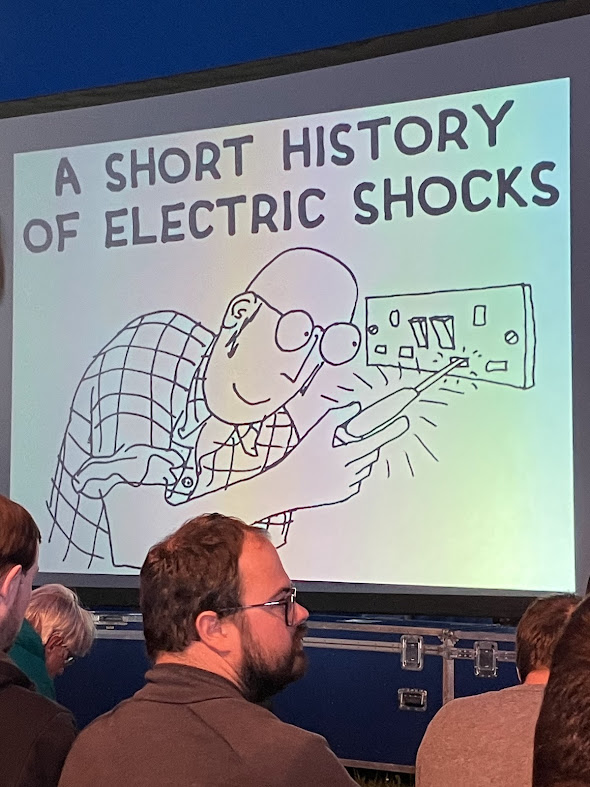
    <p>Maker hero <a href="https://www.timhunkin.com/">Tim Hunkin</a> gave a wonderful talk, “A Short History of Electric Shocks”, which was full of arresting images and gentle humour. My only regret was that I forgot to bring my copy of “Almost Everything There is to Know” for him to sign.</p>

    <p><img alt="Tim Hunkin's talk 'A Short History of Electric Shocks'" src="/assets/2024-06-03-IMG_2050.jpeg" width="400" /></p>
  </li>
  <li>For lasers, Seb Lee-Delisle is the man. His talk also included a flappy bird game, projected on the tent wall using lasers. As if that wasn’t enough, later on he projected a playable asteroids game onto the hillside!</li>
  <li>At the Maths Jam, Matthew Scroggs gave a lightning talk about the maths behind “Big Ben Strikes Again”, an episode of <em>Captain Scarlet and the Mysterons</em> when Big Ben strikes 13. It’s all in this <a href="https://www.mscroggs.co.uk/blog/44">blog post</a>, including a video reproducing the phenomenon.</li>
  <li>A 5km run around the deer park.</li>
  <li><a href="https://interactionmagic.com/">George Cave</a> kicked off the Saturday talks with “Connecting Arduinos to websites: A sequence of chaotic live demos” - he did both parts of the title with aplomb. New things for me: <code class="language-plaintext highlighter-rouge">chrome://device-log/</code>, stretch sensors, WebUSB, Adafruit ItsyBitsy, more <a href="https://github.com/Interaction-Magic/prototyping-hardware-web-talk">here</a>.</li>
  <li>My favourite talk was Skylar MacDonald’s “How to Save a Life” - about what happens when you dial 999. Fascinating subject; flawless fast-paced delivery; packed with technical nuggets.</li>
  <li>Michael Arntzenius wrote FizzBuzz in Emacs using his voice in his “Writing computer code by voice” talk. Mesmerising - it’s definitely worth a watch when the videos are made available! The key tech is <a href="https://talonvoice.com/">Talon</a> and <a href="https://marketplace.visualstudio.com/items?itemName=pokey.cursorless">Cursorless</a> (for VSCode).</li>
  <li>Richard Wiseman suffered AV issues while the audience waited - sadly, they couldn’t be fixed - but he gave a delightful magic show without any slides in “Magic Your Mind Happy”.</li>
  <li>I got a ticket to Joe Nash’s workshop “Eavesdropping on Eastnor’s bats: an introduction to bioacoustics in the field”. The bonus was that, after learning the theory, we got to build a <a href="https://www.omenie.com/about-pipistrelle.html">π•pistrelle bat detector</a>, and then go for a bat walk at dusk. The build involved surface mount devices, which I have never used before and are tiny and difficult to place on the PCB - so it was great being in a group (led by Kliment) all working alongside each other. Thankfully my detector worked, and we saw (and heard) lots of bats near the lake. What a treat.</li>
  <li>Neil Monteiro’s “From Makerspace to Outer Space” was a good way to start Sunday, and this stat jumped out at me: there are 1,300 space companies in the UK.</li>
  <li>PINECIL came up again in doop’s “Practicalities of being a walking lightshow” talk, which packed a lot of tips about the options (glow sticks, UV reactive, electroluminescence, LEDs) into 20 minutes. Their recommendation for “beatmatching” (to music) was to ignore AI and keep it simple - do it manually with a button to set the beat based on a couple of clicks.</li>
  <li>Andy Piper was asked the question “Where is the Art?” when he and his partner were showing their pen plotter art at a local art exhibition. His talk deftly mixed history with practical tips ranging from the simplest pen plotter (the charming <a href="https://www.brachiograph.art/en/latest/">BrachioGraph</a>) to the much more capable AxiDraw. Find resources <a href="https://wita.glitch.me">here</a>.</li>
</ul>

<p>Find more information from the <a href="https://www.emfcamp.org/schedule/2024">EMF 2024 schedule</a>.</p>

<p>See my <a href="https://photos.app.goo.gl/yhZRbzYryev5QQom7">photo album</a></p>]]></content><author><name></name></author><summary type="html"><![CDATA[My Electromagnetic Field 2024 highlights, in rough chronological order:]]></summary></entry><entry><title type="html">Optimizing Cubed</title><link href="/2024/04/optimizing-cubed.html" rel="alternate" type="text/html" title="Optimizing Cubed" /><published>2024-04-03T00:00:00+00:00</published><updated>2024-04-03T00:00:00+00:00</updated><id>/2024/04/optimizing-cubed</id><content type="html" xml:base="/2024/04/optimizing-cubed.html"><![CDATA[<p>[<em>This post was originally published on the <a href="https://medium.com/pangeo/optimizing-cubed-7a0b8f65f5b7">Pangeo Blog</a>.</em>]</p>

<p><em>We implemented a number of optimizations in Cubed to give a 4.8x performance improvement on the “Quadratic Means” problem when running on Lithops with AWS Lambda, with a 1.5 TB workload completing in around 100 seconds.</em></p>

<!--
What is Cubed: ND arrays; array API; distributed; bounded memory; serverless. Previous blog post about Xarray integration.

-->

<p><a href="https://github.com/cubed-dev/cubed">Cubed</a> is a library for distributed processing of large multi-dimensional array data. Here are its key design highlights:</p>

<ul>
  <li><strong>Cubed is designed to process Zarr array data at scale</strong> <br />
  More and more scientific data from such fields as genomics and geoscience is stored in Zarr format - or in a format that can be made to look like Zarr via Kerchunk. Cubed was created to take advantage of this trend.</li>
  <li><strong>Cubed runs on multiple runtimes</strong> <br />
  Cubed’s architecture means it does not need a cluster to run on, and doesn’t rely on shared state between worker processes. It provides a variety of runtime engines that use existing distributed serverless platforms like AWS Lambda and Google Cloud Functions. (However, if you do have an existing cluster, Cubed will work fine there too.)</li>
  <li><strong>Cubed has bounded memory usage</strong> <br />
  This means that as a user you can be sure that your computation won’t run out of memory.</li>
  <li><strong>Cubed implements the Python array API standard</strong> <br />
  The <a href="https://data-apis.org/array-api/2022.12/">Python array API standard</a> is emerging as a common standard for libraries and developers in the NumPy space. Cubed speaks this common language, which provides opportunities for increased interoperability with algorithms and tools from other projects.</li>
  <li><strong>Cubed can be used with Xarray</strong> <br />
  You don’t have to use the array API directly. Instead, you can run an existing <a href="https://xarray.dev/">Xarray</a> workflow on Cubed by enabling a Cubed chunk manager provided by the <a href="https://github.com/cubed-dev/cubed-xarray">cubed-xarray package</a>.</li>
</ul>

<h2 id="how-cubed-works">How Cubed works</h2>

<!--

Intermediate results are stored in Zarr arrays. Two core primitives: blockwise and rechunk.

-->

<p>The unit of work in a Cubed computation is an operation on a chunk of a Zarr array. A computation can therefore be broken down into a set of embarrassingly parallel tasks that operate on the chunks in a Zarr array.</p>

<p>More complex computations are broken into stages to get from the input array to the output array. The intermediate results are saved to persistent shared storage (typically an object store like S3) so that the next stage can read them directly.</p>

<p>Here’s an example of a computation with one intermediate Zarr array (“Zarr 2”):</p>

<p><img src="/assets/2024-04-03-cubed-idea.svg" alt="cubed-idea" /></p>

<p>This diagram shows a very simple case where chunks (also called blocks) have a simple one-to-one mapping between each stage. More complex cases are possible, where output chunks depend on more than one input chunk, and can change their shape and dtype - which is essentially what <code class="language-plaintext highlighter-rouge">blockwise</code> does (originally from Dask Array).</p>

<p>Another operation is called <code class="language-plaintext highlighter-rouge">rechunk</code> (also from Dask Array), which resizes an array’s chunks while leaving everything else the same (such as shape and dtype).</p>

<p>It turns out that essentially all of the operations in the Python array API standard can be implemented with these two primitives: <code class="language-plaintext highlighter-rouge">blockwise</code> and <code class="language-plaintext highlighter-rouge">rechunk</code>.</p>

<p>Cubed provides an implementation of the array API by expressing its operations in terms of the two primitives, and implements the two primitive operations that run on Zarr arrays using any of Cubed’s runtimes.</p>

<h2 id="visualizing-a-cubed-plan">Visualizing a Cubed plan</h2>

<p>Let’s look at a small toy computation as an example.</p>

<div class="language-python highlighter-rouge"><div class="highlight"><pre class="highlight"><code><span class="kn">import</span> <span class="nn">cubed.array_api</span> <span class="k">as</span> <span class="n">xp</span>

<span class="n">a</span> <span class="o">=</span> <span class="n">xp</span><span class="p">.</span><span class="n">asarray</span><span class="p">([[</span><span class="mi">1</span><span class="p">,</span> <span class="mi">2</span><span class="p">,</span> <span class="mi">3</span><span class="p">],</span> <span class="p">[</span><span class="mi">4</span><span class="p">,</span> <span class="mi">5</span><span class="p">,</span> <span class="mi">6</span><span class="p">],</span> <span class="p">[</span><span class="mi">7</span><span class="p">,</span> <span class="mi">8</span><span class="p">,</span> <span class="mi">9</span><span class="p">]],</span> <span class="n">chunks</span><span class="o">=</span><span class="p">(</span><span class="mi">2</span><span class="p">,</span> <span class="mi">2</span><span class="p">))</span>
<span class="n">b</span> <span class="o">=</span> <span class="n">xp</span><span class="p">.</span><span class="n">negative</span><span class="p">(</span><span class="n">a</span><span class="p">)</span>
<span class="n">c</span> <span class="o">=</span> <span class="n">xp</span><span class="p">.</span><span class="n">astype</span><span class="p">(</span><span class="n">b</span><span class="p">,</span> <span class="n">xp</span><span class="p">.</span><span class="n">float32</span><span class="p">)</span>

<span class="n">c</span><span class="p">.</span><span class="n">visualize</span><span class="p">(</span><span class="n">optimize_graph</span><span class="o">=</span><span class="bp">False</span><span class="p">)</span>
</code></pre></div></div>

<p>The call to <code class="language-plaintext highlighter-rouge">visualize</code> produces the following plan:</p>

<p><img src="/assets/2024-04-03-toy-unoptimized.svg" alt="toy-unoptimized" /></p>

<p>The first thing to note is that there are two types of nodes in the plan. Boxes with rounded corners are <em>operations</em>, while boxes with square corners are <em>arrays</em>. In this case there are three operations (labelled <code class="language-plaintext highlighter-rouge">op-001</code>, <code class="language-plaintext highlighter-rouge">op-002</code>, and <code class="language-plaintext highlighter-rouge">op-003</code>), which produce the three arrays <code class="language-plaintext highlighter-rouge">a</code>, <code class="language-plaintext highlighter-rouge">b</code>, and <code class="language-plaintext highlighter-rouge">c</code>. (There is always an additional operation called <code class="language-plaintext highlighter-rouge">create-arrays</code>, shown on the right, which Cubed creates automatically.)</p>

<p>Arrays <code class="language-plaintext highlighter-rouge">b</code> and <code class="language-plaintext highlighter-rouge">c</code> are coloured orange, which means they are materialized as Zarr arrays. Array <code class="language-plaintext highlighter-rouge">a</code> does not need to be materialized as a Zarr array since it is a small constant array that is passed to the workers running the tasks.</p>

<p>Similarly, the operations that produce <code class="language-plaintext highlighter-rouge">b</code> and <code class="language-plaintext highlighter-rouge">c</code> are shown in a lilac colour to signify that they run tasks to produce their outputs. Operation <code class="language-plaintext highlighter-rouge">op-001</code> doesn’t need to run any tasks since <code class="language-plaintext highlighter-rouge">a</code> is a small constant array.</p>

<h2 id="optimization-as-a-way-of-reducing-io">Optimization as a way of reducing IO</h2>

<p>If we now enable optimization (which is actually the default), then we get a simpler plan:</p>

<div class="language-python highlighter-rouge"><div class="highlight"><pre class="highlight"><code><span class="n">c</span><span class="p">.</span><span class="n">visualize</span><span class="p">()</span>
</code></pre></div></div>

<p><img src="/assets/2024-04-03-toy-optimized.svg" alt="toy-optimized" /></p>

<p>Operation <code class="language-plaintext highlighter-rouge">op-002</code> and array <code class="language-plaintext highlighter-rouge">b</code> have been “fused away”. That is, the intermediate Zarr array is no longer written, and <code class="language-plaintext highlighter-rouge">op-002</code> (which is the call to <code class="language-plaintext highlighter-rouge">negative</code>) is performed as a part of the tasks running <code class="language-plaintext highlighter-rouge">op-003</code>.</p>

<p>You can see the effect of this optimization in the summary at the bottom of each plan. The total number of tasks is reduced from 10 to 5, and the amount of data written to storage is reduced from 108 bytes to 36 bytes.</p>

<p>This is a very simple case, but the principle of fusing operations as a way to reduce the number of tasks needed to run the computation and also to reduce the amount of intermediate IO applies to the more complex optimizations that Cubed performs.</p>

<p>One of these newly-implemented optimizations is the ability to fuse an operation with <em>multiple</em> predecessor operations, potentially across multiple levels of the plan. In general, it is not safe to fuse arbitrarily many operations since it could break Cubed’s memory guarantees. To cope with this, Cubed will only fuse operations if the total size of the inputs to the fused operation does not cause the memory needed to execute a task to exceed the allowed memory.</p>

<h2 id="example-the-quadratic-means-problem">Example: The “Quadratic Means” problem</h2>

<!--

Motivation for the optimizations discussed below. Show a code snippet and the plan (just with simple optimizations). Number of tasks and intermediate data IO.

-->

<p>To describe the optimizations that we made to Cubed, we’ll use an example from the <a href="https://xarray.dev/blog/cubed-xarray">previous blog post</a>. The “Quadratic Means” problem is a simplified workload from climate science that finds the cross-product mean from the climatological anomalies of two variables, <em>U</em> and <em>V</em>.</p>

<p>We created a synthetic dataset stored in Zarr with 1.5 TB of random data in an Xarray dataset called <code class="language-plaintext highlighter-rouge">quad</code>:</p>

<div class="language-python highlighter-rouge"><div class="highlight"><pre class="highlight"><code><span class="n">u</span> <span class="o">=</span> <span class="n">cubed</span><span class="p">.</span><span class="n">from_zarr</span><span class="p">(</span><span class="n">paths</span><span class="p">[</span><span class="mi">0</span><span class="p">],</span> <span class="n">spec</span><span class="o">=</span><span class="n">spec</span><span class="p">)</span>
<span class="n">v</span> <span class="o">=</span> <span class="n">cubed</span><span class="p">.</span><span class="n">from_zarr</span><span class="p">(</span><span class="n">paths</span><span class="p">[</span><span class="mi">1</span><span class="p">],</span> <span class="n">spec</span><span class="o">=</span><span class="n">spec</span><span class="p">)</span>
<span class="n">ds</span> <span class="o">=</span> <span class="n">xr</span><span class="p">.</span><span class="n">Dataset</span><span class="p">(</span>
    <span class="nb">dict</span><span class="p">(</span>
        <span class="n">anom_u</span><span class="o">=</span><span class="p">([</span><span class="s">"time"</span><span class="p">,</span> <span class="s">"face"</span><span class="p">,</span> <span class="s">"j"</span><span class="p">,</span> <span class="s">"i"</span><span class="p">],</span> <span class="n">u</span><span class="p">),</span>
        <span class="n">anom_v</span><span class="o">=</span><span class="p">([</span><span class="s">"time"</span><span class="p">,</span> <span class="s">"face"</span><span class="p">,</span> <span class="s">"j"</span><span class="p">,</span> <span class="s">"i"</span><span class="p">],</span> <span class="n">v</span><span class="p">),</span>
    <span class="p">)</span>
<span class="p">)</span>
<span class="n">quad</span> <span class="o">=</span> <span class="n">ds</span><span class="o">**</span><span class="mi">2</span>
<span class="n">quad</span><span class="p">[</span><span class="s">"uv"</span><span class="p">]</span> <span class="o">=</span> <span class="n">ds</span><span class="p">.</span><span class="n">anom_u</span> <span class="o">*</span> <span class="n">ds</span><span class="p">.</span><span class="n">anom_v</span>
<span class="k">print</span><span class="p">(</span><span class="n">quad</span><span class="p">)</span>
</code></pre></div></div>

<div class="language-plaintext highlighter-rouge"><div class="highlight"><pre class="highlight"><code>&lt;xarray.Dataset&gt; Size: 2TB
Dimensions:  (time: 50000, face: 1, j: 987, i: 1920)
Dimensions without coordinates: time, face, j, i
Data variables:
    anom_u   (time, face, j, i) float64 758GB cubed.Array&lt;chunksize=(10, 1, 987, 1920)&gt;
    anom_v   (time, face, j, i) float64 758GB cubed.Array&lt;chunksize=(10, 1, 987, 1920)&gt;
    uv       (time, face, j, i) float64 758GB cubed.Array&lt;chunksize=(10, 1, 987, 1920)&gt;
</code></pre></div></div>

<p>The code to compute the means is then simply:</p>

<div class="language-python highlighter-rouge"><div class="highlight"><pre class="highlight"><code><span class="n">result</span> <span class="o">=</span> <span class="n">quad</span><span class="p">.</span><span class="n">mean</span><span class="p">(</span><span class="s">"time"</span><span class="p">,</span> <span class="n">skipna</span><span class="o">=</span><span class="bp">False</span><span class="p">)</span>
</code></pre></div></div>

<p>The resulting plan - using the old optimization settings - looks like this:</p>

<p><img src="/assets/2024-04-03-quadratic_means_xarray_50000_old.svg" alt="quadratic_means_xarray_50000_old" /></p>

<p>There are three linear series of nodes - corresponding to computing the means of <em>U</em><sup>2</sup>, <em>UV</em>, and <em>V</em><sup>2</sup>. The chains start with nodes that each have 5000 tasks at the top (to compute the powers <em>U</em><sup>2</sup> and <em>V</em><sup>2</sup> or product <em>UV</em>), then reduction rounds to compute the mean of 500 tasks, then 50 tasks, then 5 tasks, and finally 1 task.</p>

<h2 id="implementing-reduction">Implementing reduction</h2>

<p>The reduction operation to compute the mean is implemented using a tree reduce algorithm, illustrated here, where the boxes represent chunks in an array.</p>

<p><img src="/assets/2024-04-03-reduction_new_mean.svg" alt="reduction_new_mean" /></p>

<p>Each operation in the tree reduce is a partial reduce operation that reads up to a certain number of chunks (three here) and combines them into one (for calculating the mean it records totals and counts). The maximum number of chunks that each partial reduce reads is the split factor, which is specified by the <code class="language-plaintext highlighter-rouge">split_every</code> parameter in the API.</p>

<p>There is a final aggregation step that in the case of calculating the mean divides the totals by the counts.</p>

<p>What is a good choice for <code class="language-plaintext highlighter-rouge">split_every</code>? It is a <a href="https://github.com/cubed-dev/cubed/issues/331">trade off</a> - larger values make the depth of the tree reduce smaller, which makes for fewer rounds of tasks, and so the computation can complete faster. But larger values also mean each partial reduce task has to read more chunks, which makes the computation slower.</p>

<p>Note that the chunks are read and combined sequentially, which means that they stay within the the task memory allowance.</p>

<p>For the Quadratic Means problem we set <code class="language-plaintext highlighter-rouge">split_every=10</code>, which was an arbitrary choice, and not something we have tried to optimize at this stage, so further performance improvements are possible.</p>

<h2 id="quadratic-means-with-the-new-optimizations">Quadratic Means with the new optimizations</h2>

<!--
New plan for QM. Comparison of num tasks and intermediate data IO. Power of fusing operations with a different number of tasks.
-->

<p>With the new optimization settings the plan for Quadratic Means looks like this:</p>

<p><img src="/assets/2024-04-03-quadratic_means_xarray_50000_new.svg" alt="quadratic_means_xarray_50000_new" /></p>

<p>Although at first glance this plan may not look very different, a whole layer of operations has been fused away. Comparing the two plan summaries, we see that the number of tasks needed to run the computation has gone down from <strong>16683 to 1680 (a 10-fold decrease)</strong>, and the amount of data written to Zarr storage has gone down from <strong>2.3 TB to 50.5 GB (a 45-fold decrease)</strong>.</p>

<p>These are significant improvements! How was this achieved?</p>

<p>The key change is that all the operations with 5000 tasks have been fused with the operations with 500 tasks. For example, in the new plan <code class="language-plaintext highlighter-rouge">op-082</code> has been fused with its 5000 task predecessor (which no longer appears in the plan) and needs only 500 tasks. This is possible because the new optimization implementation can fuse operations that have a different number of tasks.</p>

<p>This reduces the number of tasks run and the amount of intermediate IO, but again it is a trade off since the number of chunks read by an operation is <em>multiplied</em> every time two operations are fused. In the original plan the 5000-task operations read 2 chunks each (from 2 input arrays), and the 500-task operations read 10 chunks each. When they are fused the combined operation of 500 tasks reads 20 chunks each.</p>

<p>There is an optimization setting called <code class="language-plaintext highlighter-rouge">max_total_num_input_blocks</code> which sets an upper limit on the number of blocks (chunks) that one task can read. (It defaults to 10, but we increased it to 20 for this workload.) Cubed will only fuse operations that don’t cause this limit to be exceeded.</p>

<p>This limit explains why the whole reduction isn’t fused into fewer levels and tasks. To fuse <code class="language-plaintext highlighter-rouge">op-082</code> and <code class="language-plaintext highlighter-rouge">op-083</code>, for example, would result in each task reading 200 input blocks, which would be very slow.</p>

<h2 id="benchmarks">Benchmarks</h2>

<!--
Running times for different sizes and clouds. Discussion of performance speed up.
-->

<p>How does the new optimization implementation translate into running times? Here are the times running the <a href="https://github.com/cubed-dev/cubed-benchmarks/blob/quad-means-1.5tb/tests/benchmarks/test_array.py">1.5TB workflow</a> using Lithops on AWS Lambda with the old and new optimization implementations:</p>

<table>
  <thead>
    <tr>
      <th>Optimization implementation</th>
      <th>Compute arrays in parallel</th>
      <th>Runtime (s)</th>
      <th>Relative runtime</th>
    </tr>
  </thead>
  <tbody>
    <tr>
      <td>Old</td>
      <td>No</td>
      <td>475.1</td>
      <td>4.8</td>
    </tr>
    <tr>
      <td>New</td>
      <td>No</td>
      <td>176.6</td>
      <td>1.8</td>
    </tr>
    <tr>
      <td>New</td>
      <td>Yes</td>
      <td>100.0</td>
      <td>1</td>
    </tr>
  </tbody>
</table>

<p>Overall we gained a <strong>4.8x speedup</strong>.</p>

<!--

| Optimization implementation | Compute arrays in parallel | Runtime (s) | Relative runtime |
| --- | --- | --- | --- |
| Old  | No | 444.1 | 4.7|
| New | No | 167.9 | 1.8|
| New | Yes | 94.9 | 1 |

| Optimization implementation | Compute arrays in parallel | Runtime (s) | Relative runtime |
| --- | --- | --- | --- |
| Old  | No | 469.3 | 4.2|
| New | No | 188.1 | 1.7|
| New | Yes | 111.0 | 1 |
-->

<p>Most of the improvement was through the improvements in fusion, but some of the improvement was by enabling the <code class="language-plaintext highlighter-rouge">compute_arrays_in_parallel</code> runtime flag, which increases parallelism in the three independent series of computations for <em>U</em><sup>2</sup>, <em>UV</em>, and <em>V</em><sup>2</sup>.</p>

<p>The cost of running the optimized workflow was $2.27 according to the AWS billing page - this includes storage and compute, as well as the initial set up to write the random dataset to S3.</p>

<p>We also ran the same workflow using Lithops on Google Cloud Functions. Here is one typical run:</p>

<table>
  <thead>
    <tr>
      <th>Optimization implementation</th>
      <th>Compute arrays in parallel</th>
      <th>Runtime (s)</th>
      <th>Relative runtime</th>
    </tr>
  </thead>
  <tbody>
    <tr>
      <td>Old</td>
      <td>No</td>
      <td>1049.4</td>
      <td>2.1</td>
    </tr>
    <tr>
      <td>New</td>
      <td>No</td>
      <td>807.0</td>
      <td>1.7</td>
    </tr>
    <tr>
      <td>New</td>
      <td>Yes</td>
      <td>488.4</td>
      <td>1</td>
    </tr>
  </tbody>
</table>

<!--
| Optimization implementation | Compute arrays in parallel | Runtime (s) | Relative runtime |
| --- | --- | --- | --- |
| Old  | No | 1276.2 	 | 2.3|
| New | No | 1258.0 | 2.3|
| New | Yes | 544.4 | 1 |
-->

<p>We found that running Lithops with Google Cloud Functions is slower than AWS Lambda by a significant margin. This needs more investigation, but we think function dispatch may be slower on Google Cloud Functions. We also noticed that we get more task failures. These are handled by backup tasks, but at the expense of overall runtime. Backup tasks also increase the variance of times from run to run, and this means that the overall speedup measured can vary by a wide margin.</p>

<h2 id="whats-next">What’s next?</h2>

<p>Our work on the Cubed optimization implementation has yielded significant gains in speed for the Quadratic Means problem that we have focused on.</p>

<p>We are building a set of benchmarks in the <a href="https://github.com/cubed-dev/cubed-benchmarks">cubed-benchmarks</a> repo that we will use to track the progress of further improvements. We also have some interesting features on our roadmap, such as support for <a href="https://github.com/cubed-dev/cubed/issues/223">groupby in Xarray</a>, and filling in some gaps in <a href="https://github.com/cubed-dev/cubed/issues?q=is%3Aissue+is%3Aopen+label%3A%22array+api%22">array API support</a>.</p>

<p>While there are always <a href="https://github.com/cubed-dev/cubed/issues?q=is%3Aissue+is%3Aopen+label%3Aoptimization">more optimizations</a> to do, we believe that Cubed’s performance is now competitive enough for wider usage. If you are an Xarray user with a challenging workload we’d love you to try Cubed on your workload and let us know how it goes.</p>

<h2 id="acknowledgments">Acknowledgments</h2>

<p>Many thanks to Ryan Abernathey and Tom Nicholas for their valuable feedback and comments on this blog post.</p>

<p>This work was done in collaboration the the <a href="https://ocean-transport.github.io/">Climate Data Science Lab</a> at Columbia University and supported by the Gordon and Betty Moore Foundation.</p>]]></content><author><name>Tom White</name></author><summary type="html"><![CDATA[[This post was originally published on the Pangeo Blog.]]]></summary></entry><entry><title type="html">Refurbishing my ZX81</title><link href="/2022/12/refurbishing-my-zx81.html" rel="alternate" type="text/html" title="Refurbishing my ZX81" /><published>2022-12-29T00:00:00+00:00</published><updated>2022-12-29T00:00:00+00:00</updated><id>/2022/12/refurbishing-my-zx81</id><content type="html" xml:base="/2022/12/refurbishing-my-zx81.html"><![CDATA[<p>Forty years on since I received a ZX81 as a Christmas present, I’ve got it up and running again. This post has some notes on how I did it.</p>

<p>There are a lot of great guides explaining how to refurbish a ZX81, which go into more depth than my brief notes here. I refer to them throughout this post, and recommend them for anyone who is interested in reviving an old ZX81.</p>

<ul>
  <li><a href="https://retrorepairsandrefurbs.com/2021/07/05/sinclair-zx81-restoration/">Sinclair ZX81 Restoration</a> by Adam Wilson</li>
  <li><a href="https://www.youtube.com/watch?v=xyluEM0N6TY">Restoring and Exploring a 1981 Sinclair ZX81</a> by RMC - The Cave</li>
  <li><a href="https://www.zx81keyboardadventure.com/2017/02/simple-start-to-retrofitting-zx81.html">Simple Start to Retrofitting a ZX81</a> by David Stephenson</li>
  <li><a href="http://kevman3d.blogspot.com/2016/02/rejuvenating-my-geriatric-childhood.html">Rejuvenating my geriatric childhood friend</a> by kevman3d</li>
</ul>

<h3 id="display">Display</h3>

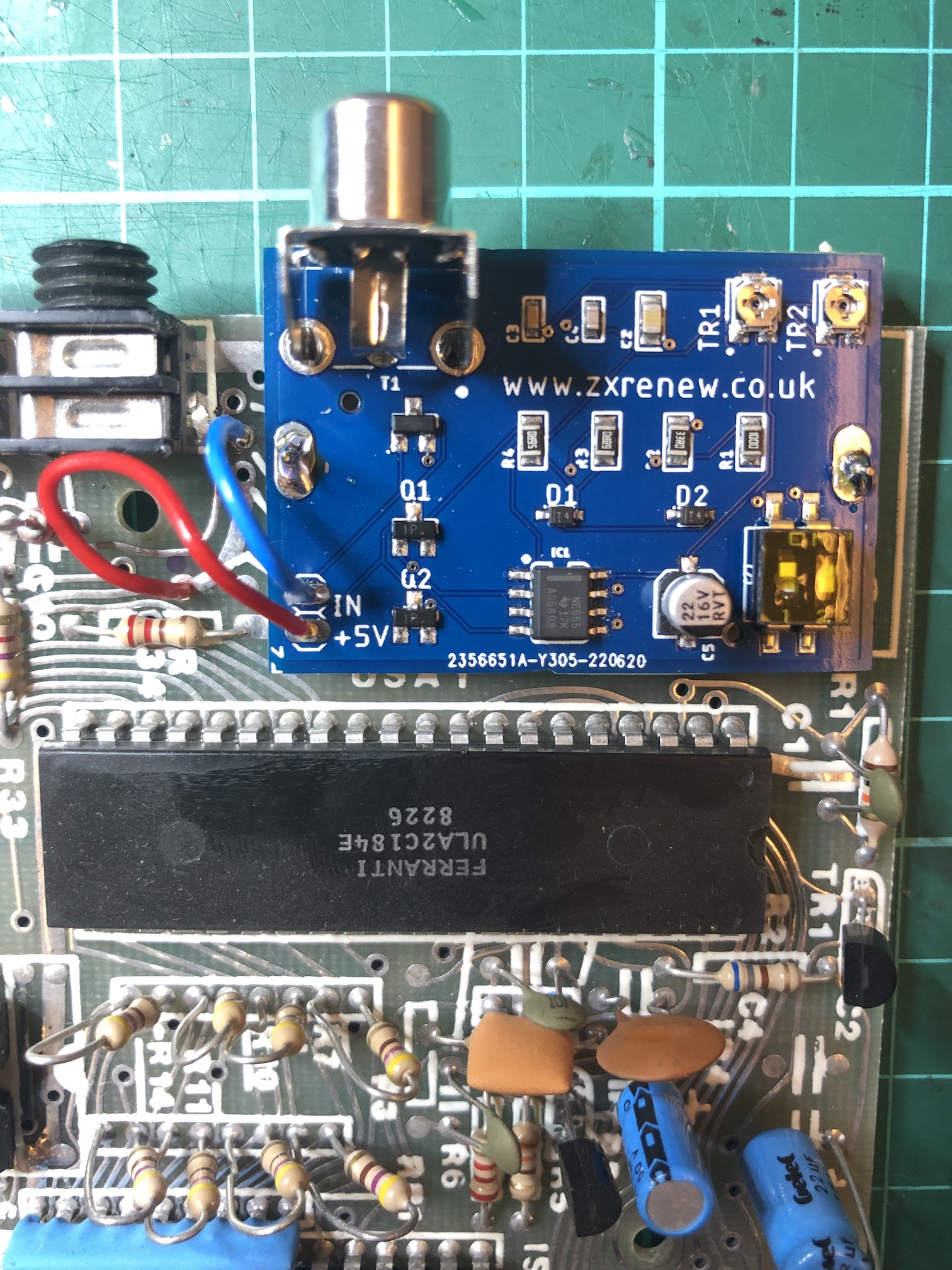
<p>The ZX81 produces RF output for old TVs, so the first thing I had to think about was a modification to produce composite output for more modern TVs. Luckily, there are lots of kits to do this, which makes it pretty straightforward.</p>

<p>I got a <a href="https://zxrenew.co.uk/ZX81-Composite-Modulator-replacement-p364473489">ZX2020 kit</a> from <a href="https://zxrenew.co.uk/">ZX Renew</a>. After reading <a href="http://kevman3d.blogspot.com/2016/02/rejuvenating-my-geriatric-childhood.html">Rejuvenating my geriatric childhood friend</a>, I was prepared for it to be a bit of a battle, but it wasn’t as I had a different kit which involved removing the original RF box completely, and replacing it with a small, custom-made PCB. Using some solder braid and a desoldering pump I managed to remove the RF box without too much trouble.</p>

<p><img src="/assets/zx81_with_composite_video_mod.jpg" alt="ZX81 with composite video mod" /></p>

<p>Another problem was that I don’t own a TV with a composite video input. So I went looking on eBay, and after reading <a href="https://www.zx81keyboardadventure.com/2017/08/zx81-video-monitor-perfection.html">ZX81 Video Monitor Perfection?</a> settled on an old (80s vintage) PVM (Professional Video Monitor) with a CRT. I got a <a href="https://archive.org/details/manual_PVM9020ME_SM_SONY/page/n5/mode/1up">Sony PVM9020ME SM</a>. Its 8-inch screen seemed appropriate as it wasn’t much smaller than the black and white TV I used with my ZX81 when I was using it in the early 1980s. An LCD screen was another option, and while lacking the retro hum it would have a nice sharp display.</p>

<h3 id="power-supply">Power supply</h3>

<p>Before I could see if the composite video mod had worked, I needed to give the ZX81 power supply some attention.</p>

<p>The original power supply no longer had a power jack. There were just bare wires at the DC end, as I must have cut it off at some point for another project. The jack is a 3.5mm mono audio jack, which is unusual for a power supply. The Spectrum uses the more standard DC barrel type connector. Unfortunately, I didn’t realise the <a href="https://spectrumforeveryone.com/features/zx-spectrum-running-zx81-power/">power supplies for the ZX81 and Spectrum</a> were different, and I ordered a connector for the Spectrum, assuming they were the same.</p>

<p>But, no problem, as I got the power supply working again by simply soldering a new jack to the bare wires. The (inner) tip needs to be positive, and the outer ring is ground. I also replaced the mains plug with a modern one with insulated live and neutral prongs.</p>

<p>A multimeter reading told me that the power supply was producing about 14.4V, rather than the nominal 9V, which is to be expected since it is an unregulated power supply.</p>

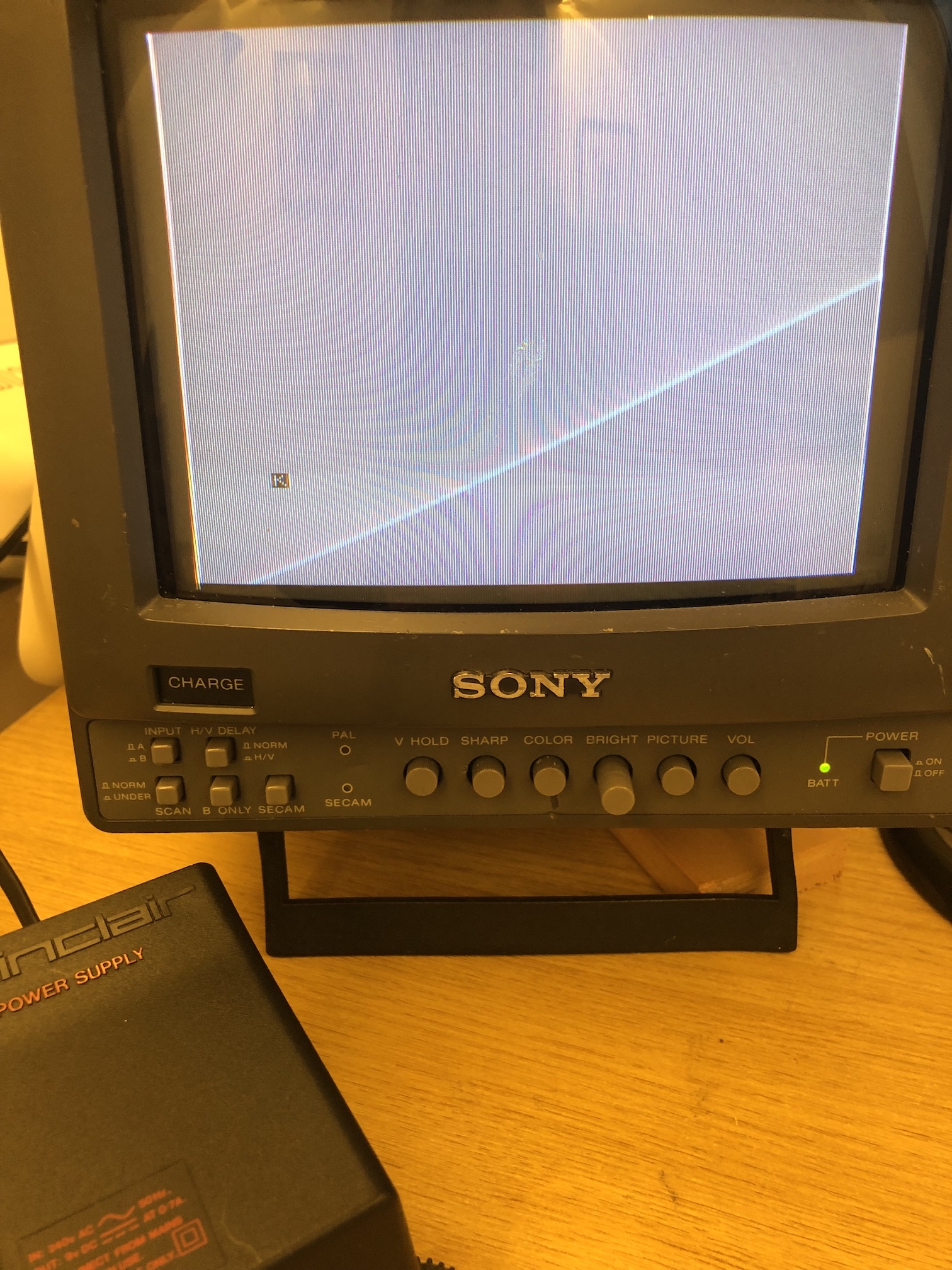
<p>At this point I plugged in the power and the video cable into the ZX81, turned on the power … and I saw the familiar inverse <code class="language-plaintext highlighter-rouge">K</code> symbol!</p>

<p><img src="/assets/zx81_working.jpg" alt="ZX81 working again" /></p>

<h3 id="voltage-regulator">Voltage regulator</h3>

<p>I noticed that the heatsink on the voltage regulator was getting pretty hot even after running for only a couple of minutes.</p>

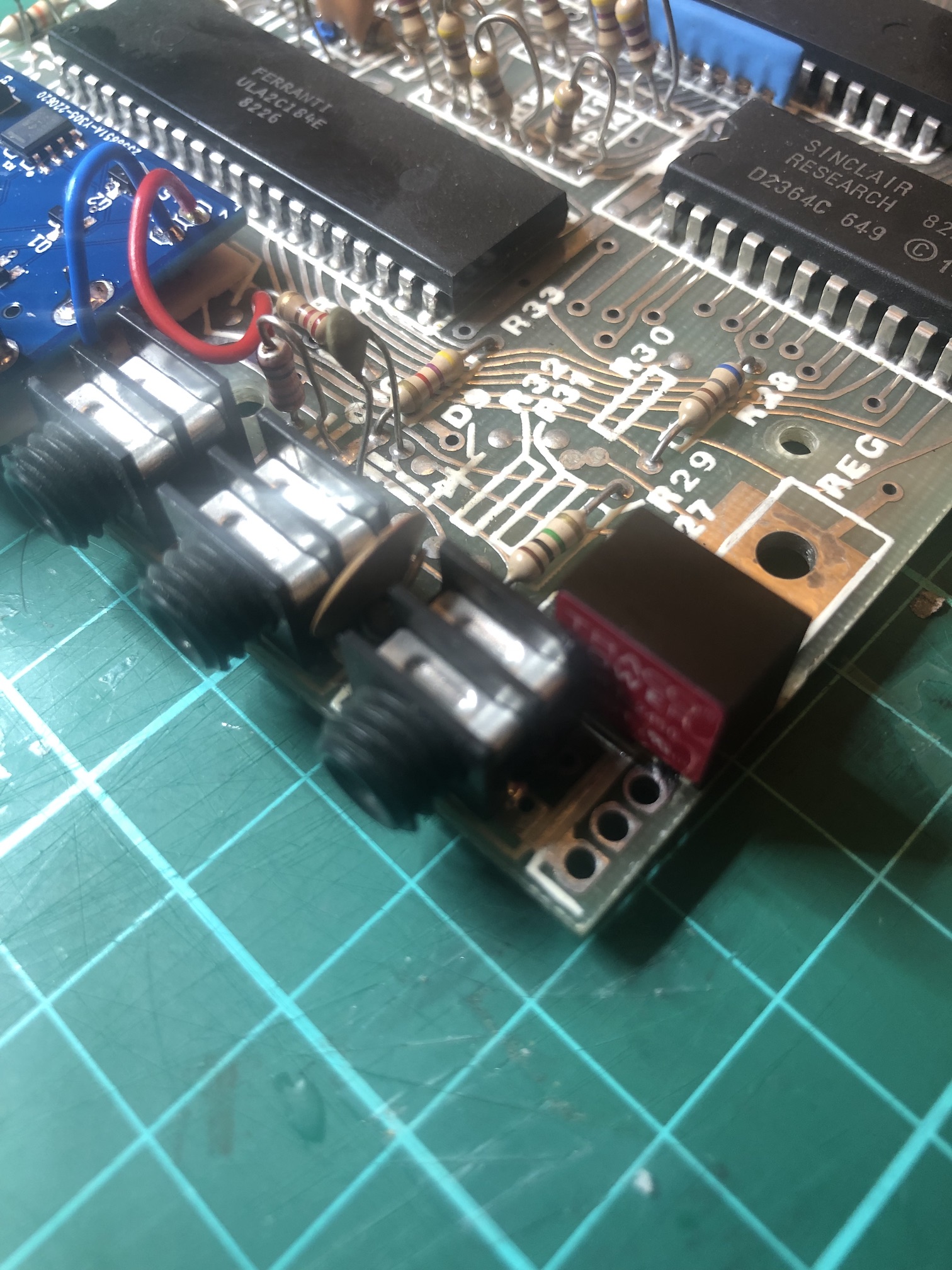
<p>To avoid this, it’s a <a href="https://retrorepairsandrefurbs.com/2021/07/05/sinclair-zx81-restoration/">good idea</a> to replace the original voltage regulator with a more efficient version that doesn’t need a heatsink. I used the <a href="https://www.youmakerobots.com/sinclair/68-zx-spectrum-zx81-5v-regulator-upgrade.html">TSR 1-2450 from You Make Robots</a>.</p>

<p>It took a bit of effort to get the solder out, and I snapped one of the legs of the old regulator when removing it.</p>

<p><img src="/assets/zx81_voltage_regulator.jpg" alt="ZX81 with new voltage regulator" /></p>

<p>I checked it still worked after changing the regulator - thankfully it did.</p>

<h3 id="capacitors">Capacitors</h3>

<p>Although the ZX81 seemed to be working fine (although I hadn’t tested the keyboard at this point), most things I’ve read say it’s a good idea to replace the capacitors, also know as “re-capping”. I got replacement capacitors from <a href="https://www.retroleum.co.uk/zx81-components">Retroleum</a>, which has packs for different board revisions. Mine was an issue one board from 1980 (this is printed on the board itself), so I only had to replace two capacitors, C3 and C5.</p>

<p>Desoldering was a bit of a fiddle; this <a href="http://blog.retroleum.co.uk/electronics-articles/re-capping-the-spectrum/">blog post</a> has some tips that I found useful.</p>

<h3 id="keyboard">Keyboard</h3>

<p>I was amazed to learn that there are people still making the ZX81 keyboard - so I picked one up from <a href="https://zxrenew.co.uk/Sinclair-ZX81-Membrane-p102352920">ZX Renew</a>. Replacing the keyboard was fairly easy, and required no soldering. (I basically did what was described in <a href="http://kevman3d.blogspot.com/2016/02/rejuvenating-my-geriatric-childhood.html">this blog post</a>.)</p>

<h3 id="running-a-program">Running a program</h3>

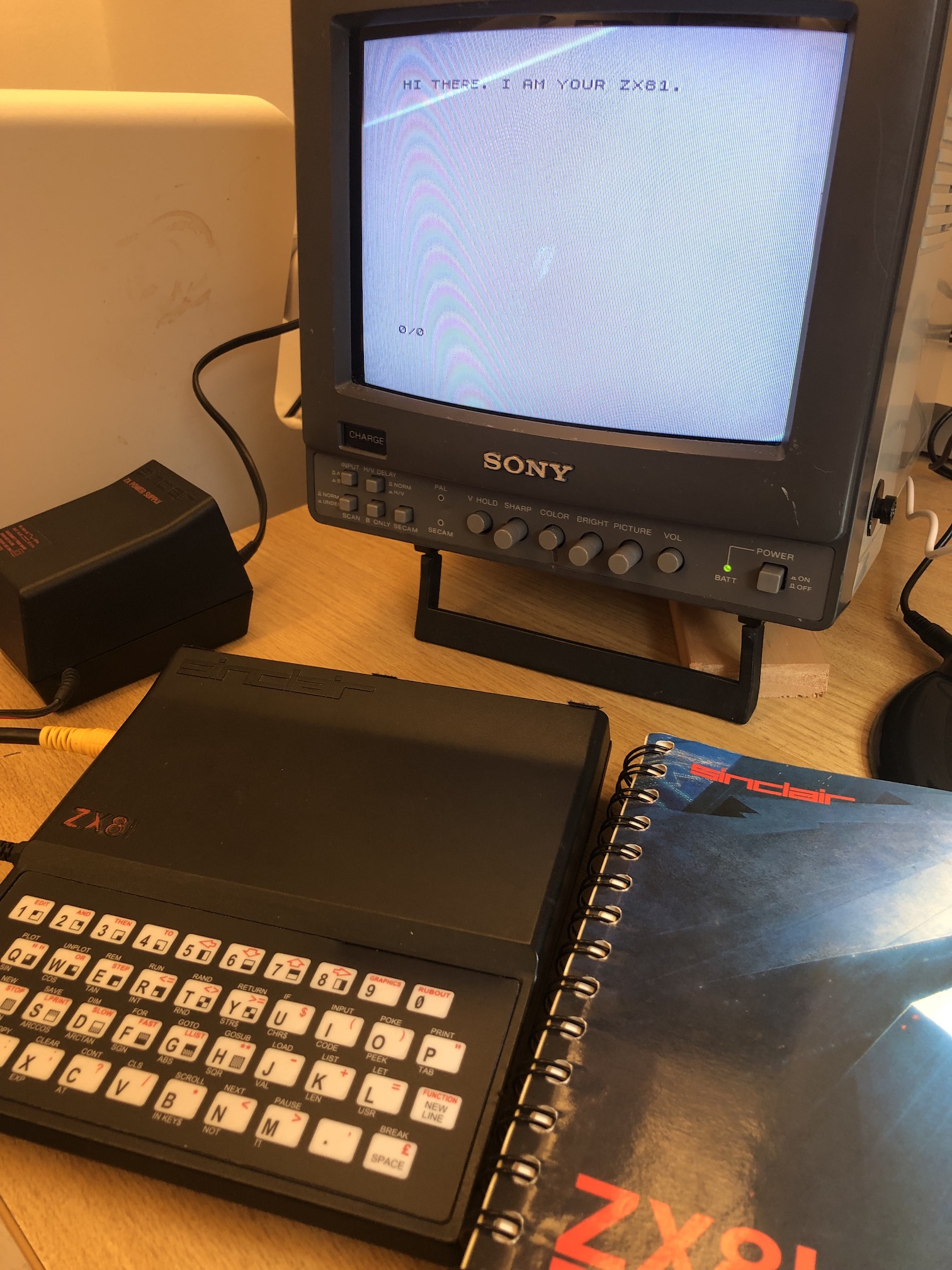
<p>After all that work I turned on the ZX81 and I tried running a small program:</p>

<p><img src="/assets/zx81_all_done.jpg" alt="ZX81 all done" /></p>

<p>So that’s where I’ve got to. I’m slightly surprised that it works at all after all these years and after making all these modifications.</p>

<p>The next obvious thing to do is to load some programs. This <a href="https://www.youmakerobots.com/retro-microsd-tape-device/42-tzxduinocasduinomaxduino-kit.html">TZXDuino kit</a> looks tempting. I could use it to load <a href="https://github.com/tomwhite/zx81-frogging">the first program I wrote</a>, which I reverse engineered from a cassette tape a few years ago. Or I could just type it in, like in the old days…</p>]]></content><author><name></name></author><summary type="html"><![CDATA[Forty years on since I received a ZX81 as a Christmas present, I’ve got it up and running again. This post has some notes on how I did it.]]></summary></entry><entry><title type="html">My favourite proof</title><link href="/2020/10/my-favourite-proof.html" rel="alternate" type="text/html" title="My favourite proof" /><published>2020-10-07T00:00:00+00:00</published><updated>2020-10-07T00:00:00+00:00</updated><id>/2020/10/my-favourite-proof</id><content type="html" xml:base="/2020/10/my-favourite-proof.html"><![CDATA[<script src="https://polyfill.io/v3/polyfill.min.js?features=es6"></script>

<script id="MathJax-script" async="" src="https://cdn.jsdelivr.net/npm/mathjax@3/es5/tex-mml-chtml.js"></script>

<p>
My younger daughter Lottie is 16 today, and I gave her a square card with \(2^4\) on one side and \(4^2\) on the other.

</p>

<p>
  \[2^4 = 4^2\]
</p>

<p>
This is the only solution to \(a^b = b^a\) for whole numbers \(a\) and \(b\). The proof of this statement is especially elegant. I can't remember where I read it first, but it was when I was doing my A-levels.
</p>

<p>
Starting with
  \[a^b = b^a\]
taking (natural) logs
  \[b \log a = a \log b\]
and rearranging, we get
  \[\frac{\log a}{a} = \frac{\log b}{b}\]
</p>

<p>
Now consider the graph
    \[y = \frac{\log x}{x}\]
</p>

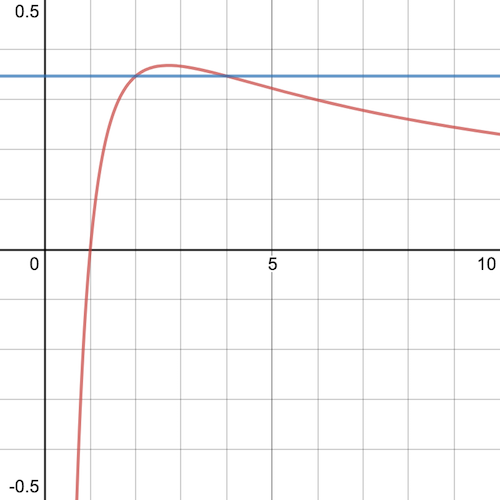
<p>plotted here in red (thanks to <a href="https://www.desmos.com/calculator/62sc6ptpgw">Desmos</a>):</p>

<p><img src="/assets/my-favourite-proof-graph1.png" alt="Graph of y = log(x)/x" /></p>

<p>
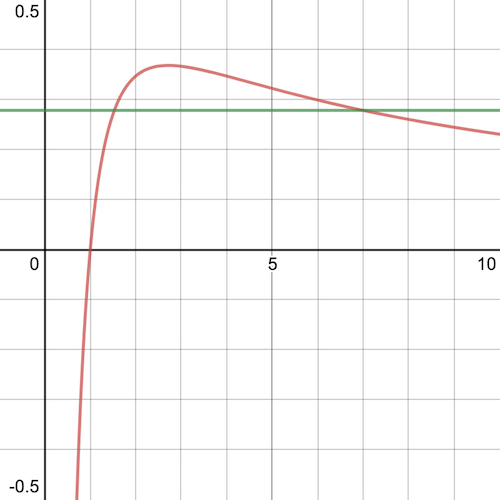
The notable thing about the graph is that it intercepts the \(x\) axis at \(x=1\), rises to a maximum between \(x=2\) and \(x=3\), then steadily decreases as \(x\) increases, but never reaches the \(x\) axis.
</p>

<p>
The blue line shows the solution above graphically, since
    \[\frac{\log 2}{2} = \frac{\log 4}{4} \approx 0.35\]
</p>

<p>
Now, this graph shows that \(a=2\), \(b=4\) is the <i>only</i> solution.
</p>

<p>
To see why, imagine that there is another solution, \(a&gt;4\). Then, draw a horizontal line through the point on the graph where \(x=a\), shown here in green:
</p>

<p><img src="/assets/my-favourite-proof-graph2.png" alt="Graph of y = log(x)/x with non-solution" /></p>

<p>
The green line intercepts the red curve strictly between \(x=1\) and \(x=2\), which shows that \(x\) <i>is not a whole number</i>. Therefore, there are no whole number solutions for \(a&gt;4\).
</p>

<p>
Finally, we can see that \(a=3\) does not have any solutions, for the same reason (the other intercept is strictly between  \(x=2\) and \(x=3\) and again is not a whole number).
</p>

<p>
The thing I like about this proof is that it proves something about <i>whole numbers</i>, by operating in the domain of <i>real numbers</i>, and by using simple arguments about the properties of the graph of a function.
</p>

<p>
[One last pleasing thing. It's easy to show (by differentiation and setting to zero), that the curve is at its maximum at \(x=e\).]
</p>]]></content><author><name></name></author><summary type="html"><![CDATA[]]></summary></entry><entry><title type="html">Looking for Interesting Data Projects</title><link href="/2020/05/looking-for-interesting-data-projects.html" rel="alternate" type="text/html" title="Looking for Interesting Data Projects" /><published>2020-05-05T00:00:00+00:00</published><updated>2020-05-05T00:00:00+00:00</updated><id>/2020/05/looking-for-interesting-data-projects</id><content type="html" xml:base="/2020/05/looking-for-interesting-data-projects.html"><![CDATA[<p>Five years ago, in <a href="/2015/01/hadoop-for-science.html">Hadoop for Science</a> I wrote about how three trends - open data, notebooks, and distributed data frames - were converging to make it easier “for scientists to analyse large amounts of data, on demand and in a way that is repeatable, using powerful high-level machine learning libraries”.</p>

<p>In the intervening years I’ve been lucky enough to be able to help with this vision. First in the genomics space, working with a team at the <a href="https://www.broadinstitute.org/">Broad Institute</a> led by David Roazen to get <a href="https://software.broadinstitute.org/gatk/">GATK</a> pipelines running at scale on Spark. (And in the process getting <a href="https://github.com/disq-bio/disq">bioinformatics file formats to work in a distributed setting</a>.) Then in single cell analysis, where I worked with Uri Laserson’s group at <a href="https://icahn.mssm.edu/">Mount Sinai</a> (NYC) to port the single cell preprocessing pipeline in <a href="https://scanpy.readthedocs.io/">Scanpy</a> so it could run in parallel using <a href="https://dask.org/">Dask</a>, and on GPUs using <a href="https://rapids.ai/">RAPIDS</a>.</p>

<p>I’ve also been drawn to volunteer projects involving open data, including <a href="https://github.com/tomwhite/leveltheplayingfield">analysing Wales school funding data</a>, analysing the data for our local <a href="http://tom-e-white.com/crick-parking/">car park</a>, and most recently making <a href="https://github.com/tomwhite/covid-19-uk-data">UK COVID-19 data machine-readable</a> (which has been used by the Financial Times for its <a href="https://www.ft.com/coronavirus-latest">COVID visualizations</a>).</p>

<p>At the beginning of this year I went on sabbatical and started a <a href="http://tom-e-white.com/datavision/index-alt.html">blog about data visualization</a> with the goal of creating one interesting visualization per week - with no constraints on dataset, visualization type, or technology. So far it’s been a useful exercise to make me become more fluent in exploring new datasets, and trying out new dataviz libraries (D3.js has become a particular favourite).</p>

<p>Now it’s time for something new. So, if you have an interesting data project - particularly those with infrastructure or data engineering challenges - I’d love to hear from you!</p>]]></content><author><name></name></author><summary type="html"><![CDATA[Five years ago, in Hadoop for Science I wrote about how three trends - open data, notebooks, and distributed data frames - were converging to make it easier “for scientists to analyse large amounts of data, on demand and in a way that is repeatable, using powerful high-level machine learning libraries”.]]></summary></entry><entry><title type="html">Bristech 2019</title><link href="/2019/11/bristech-2019.html" rel="alternate" type="text/html" title="Bristech 2019" /><published>2019-11-08T11:38:00+00:00</published><updated>2019-11-08T11:38:00+00:00</updated><id>/2019/11/bristech-2019</id><content type="html" xml:base="/2019/11/bristech-2019.html"><![CDATA[<div class="separator" style="clear: both; text-align: center;"><a href="/assets/2019-11-08-image-0001.jpg" imageanchor="1" style="clear: left; float: left; margin-bottom: 1em; margin-right: 1em;"><img border="0" data-original-height="1600" data-original-width="1200" height="320" src="/assets/2019-11-08-image-0000.jpg" width="240" /></a></div>Yesterday I went to <a href="https://2019.bris.tech/">Bristech</a>. What a great conference! It’s one day, three tracks.<br /><br /><!--?xml version="1.0" encoding="UTF-8"?--> The thing I like about it is the variety of the talks. It’s not organized around a single programming language or technology, so it’s easy to go to talks outside your usual sphere of interest (it’s quite hard not to). I went to talks about MLOps (keynote by Luke Marsden), the Language Server Protocol (by Krzysztof Cieślak), a reactive JS compiler called Svelte (by Peter Allen), accessibility (by&nbsp;Svetlana Kouznetsova), Cloud Native ML (by&nbsp;Ant Kennedy), and building autonomous Mars rovers (by&nbsp;Mark Woods).&nbsp;I gave a talk on <a href="https://2019.bris.tech/tom-white">Single Cell data and algorithms</a> (thanks to Steve&nbsp;Loughran for suggesting I submit it, as well as <a href="https://twitter.com/steveloughran/status/1192410323988500480">live tweeting</a> it!).<br /><!--?xml version="1.0" encoding="UTF-8"?--> <br /><div>Nic Hemley and the other organizers put a lot of work into lots of small details that made the day more memorable. To name a few: the Icelandic thunder clap; caterpillar and butterfly stickers to encourage attendees to talk to each other; lunchtime <a href="https://www.larkhall.org/">music and visuals</a>; cinema popcorn.&nbsp;</div><div><br /></div><div><!--?xml version="1.0" encoding="UTF-8"?--> As a speaker I was very impressed by the care taken by track chairs on the speaker intros. Speakers were asked beforehand to fill in a short “interview” document, which chairs then used to write an intro for each speaker. My track chair was <a href="https://opcan.co.uk/">Hannah Smith</a> who was also very good at gently reminding people in the Q&amp;A session to ask questions rather than give their opinions. So we didn’t have any “this is more of a comment than a question” style ramblings, which I’m sure everyone was pleased about.</div><div><br /></div><div><!--?xml version="1.0" encoding="UTF-8"?--> And the Watershed is a very nice venue, even if it gets “<a href="https://twitter.com/dancookdev/status/1192712736066744321">night club busy</a>” between talks.</div><div><br /></div><div><!--?xml version="1.0" encoding="UTF-8"?--> Great conference. Highly recommended.</div>]]></content><author><name>Tom White</name></author><summary type="html"><![CDATA[Yesterday I went to Bristech. What a great conference! It’s one day, three tracks. The thing I like about it is the variety of the talks. It’s not organized around a single programming language or technology, so it’s easy to go to talks outside your usual sphere of interest (it’s quite hard not to). I went to talks about MLOps (keynote by Luke Marsden), the Language Server Protocol (by Krzysztof Cieślak), a reactive JS compiler called Svelte (by Peter Allen), accessibility (by&nbsp;Svetlana Kouznetsova), Cloud Native ML (by&nbsp;Ant Kennedy), and building autonomous Mars rovers (by&nbsp;Mark Woods).&nbsp;I gave a talk on Single Cell data and algorithms (thanks to Steve&nbsp;Loughran for suggesting I submit it, as well as live tweeting it!). Nic Hemley and the other organizers put a lot of work into lots of small details that made the day more memorable. To name a few: the Icelandic thunder clap; caterpillar and butterfly stickers to encourage attendees to talk to each other; lunchtime music and visuals; cinema popcorn.&nbsp; As a speaker I was very impressed by the care taken by track chairs on the speaker intros. Speakers were asked beforehand to fill in a short “interview” document, which chairs then used to write an intro for each speaker. My track chair was Hannah Smith who was also very good at gently reminding people in the Q&amp;A session to ask questions rather than give their opinions. So we didn’t have any “this is more of a comment than a question” style ramblings, which I’m sure everyone was pleased about. And the Watershed is a very nice venue, even if it gets “night club busy” between talks. Great conference. Highly recommended.]]></summary></entry><entry><title type="html">How I manage my diabetes</title><link href="/2019/11/how-i-manage-my-diabetes.html" rel="alternate" type="text/html" title="How I manage my diabetes" /><published>2019-11-02T13:07:00+00:00</published><updated>2019-11-02T13:07:00+00:00</updated><id>/2019/11/how-i-manage-my-diabetes</id><content type="html" xml:base="/2019/11/how-i-manage-my-diabetes.html"><![CDATA[<div style="-en-clipboard: true;">I was <a href="/2018/04/type-1-diabetes.html">diagnosed with Type 1 Diabetes</a> (T1D) in February last year. Since then I have learnt a lot about the condition, and how to manage it. The first few months were quite turbulent, but now it’s become more settled and is a part of life, and thankfully I don’t spend every minute thinking about it. It never goes away though. </div><div><br />In this post I describe the technology I’m using to manage T1D. Every PWD (person with diabetes) is different, so what works for me won’t necessarily work for others. Also, some of these things don’t even work for me all the time, such is the unpredictable nature of diabetes. So there are definitely improvements I could make. I’ll mention some of them at the end of this piece.</div><div><br /></div><div><br /><table align="center" cellpadding="0" cellspacing="0" class="tr-caption-container" style="margin-left: auto; margin-right: auto; text-align: center;"><tbody><tr><td style="text-align: center;"><a href="https://1.bp.blogspot.com/-Z-xGyoowWy4/Xb19jvAKoLI/AAAAAAAADcc/Q4S79SXDlG0P6j50oW-T6XDUrgJfsdMAACLcBGAsYHQ/s1600/IMG_0041.JPG" imageanchor="1" style="margin-left: auto; margin-right: auto;"><img border="0" data-original-height="1200" data-original-width="1600" height="300" src="/assets/2019-11-02-image-0000.JPG" width="400" /></a></td></tr><tr><td class="tr-caption" style="text-align: center;">Some of my diabetes kit</td></tr></tbody></table><!--?xml version="1.0" encoding="UTF-8"?--> <br /><div>The main tools I use are a <span style="font-weight: bold;">FreeStyle Libre</span> to measure my blood glucose levels, and <span style="font-weight: bold;">insulin pens</span> to administer&nbsp;multiple daily injections (MDI) of insulin. I also use a number of apps and websites to manage the data.<br /><br />Quite simply, the <a href="https://www.freestylelibre.co.uk/libre/">Libre</a> is a superb piece of technology. It gives an amazing amount of insight into blood glucose levels - you can see what happens after you eat a particular food, or the effect of exercise, and even what happened to your levels during the night. I’ve been using one for over a year, and without it I really think I would be a lot more stressed about BG levels, and probably overcompensating for lows and oblivious to highs.</div><div><br /></div><div>There are two parts to the Libre system: the sensor and the reader. The sensor is a small white disc that you stick to your upper arm. It has a small needle that sits under the skin where the glucose sensor is located. Each sensor lasts 14 days before it must be changed. The reader is a custom device, like a tiny phone (see picture above), but you can also use your phone to read the sensor using NFC. The sensor only stores 8 hours worth of measurements, so you need to tap the reader on the sensor at least that often to avoid gaps in history. </div><div><br /></div><div>I use the reader rather than my phone to read the sensor (I only recently upgraded my phone to a version that can read the sensor). The reader can store 90 days of readings, so I periodically download the data as a backup and as a way to run different analyses on it. </div><div><br /></div><div>Abbott, the company that manufactures the Libre, provides a desktop application to download the data from the Libre over USB. I wrote a <a href="https://github.com/tomwhite/libre-nightscout-uploader">script</a>&nbsp;to upload the resulting data to a service called Nightscout.&nbsp;</div></div><div><br /></div><table align="center" cellpadding="0" cellspacing="0" class="tr-caption-container" style="margin-left: auto; margin-right: auto; text-align: center;"><tbody><tr><td style="text-align: center;"><a href="/assets/2019-11-02-image-0005.png" imageanchor="1" style="margin-left: auto; margin-right: auto;"><img border="0" data-original-height="1143" data-original-width="1600" height="456" src="/assets/2019-11-02-image-0001.png" width="640" /></a></td></tr><tr><td class="tr-caption" style="text-align: center;">Nightscout</td></tr></tbody></table><!--?xml version="1.0" encoding="UTF-8"?--> <br /><div><a href="http://www.nightscout.info/">Nightscout</a>&nbsp;is an open source project created by the #WeAreNotWaiting community to allow people with T1D to store their CGM data in the cloud. It was started as a way for parents of children with T1D to monitor their BG levels (particularly at night, without disturbing them), but it is now widely used by many in the T1D community, and forms a basis for DIY looping systems, like OpenAPS. </div><div><br /></div><div>I use Nightscout&nbsp;as a historical data store, rather than for its realtime capabilities. I like Nightscout&nbsp;because it's open source and therefore not tied to a corporation (which could pull the service, change its terms, etc), but the downside is that you do have to run your own service, although that’s pretty easy to do on Heroku.&nbsp;</div><div><br /><table align="center" cellpadding="0" cellspacing="0" class="tr-caption-container" style="margin-left: auto; margin-right: auto; text-align: center;"><tbody><tr><td style="text-align: center;"><a href="/assets/2019-11-02-image-0006.png" imageanchor="1" style="margin-left: auto; margin-right: auto;"><img border="0" data-original-height="638" data-original-width="1600" height="254" src="/assets/2019-11-02-image-0002.png" width="640" /></a></td></tr><tr><td class="tr-caption" style="text-align: center;">Weekly BG summaries with dboard</td></tr></tbody></table>Nightscout&nbsp;provides its own analytics, which are very useful. I also wrote a webpage to provide a weekly summary called <a href="https://github.com/tomwhite/dboard">dboard</a> that reads data from Nightscout&nbsp;and shows a few key stats (time in range, average BG, estimated HbA1c) for the week, so I can see at a glance how the week was.</div><div><br /><div style="-en-clipboard: true;">Turning to <b>insulin</b>, MDI uses two types of insulin - a basal dose of long-acting insulin (I use Levemir) every night before bed that provides a background supply of insulin over the day, and bolus doses of rapid-acting insulin (I use NovoRapid) taken before every meal or snack and which are adjusted to “cover” the carbs in that meal. </div><div><br /></div><div>I don’t have an insulin pump. After I was diagnosed I assumed that I would eventually move on to one, since they offer a high degree of blood glucose control. However, my doctor said that since my control was very good using MDI, there wasn’t a strong reason to move to a pump. I'm still on MDI, and it works well for me. I was quite surprised to find that the needles on insulin pens are so fine that you can barely feel them, so injections are not normally painful. Extracting a drop of blood from a finger with a lancet for testing the blood glucose level hurts more. </div><div><br /></div><div>Interestingly, it’s very likely that I’m still in the “honeymoon phase” of T1D, which is when the body still produces some insulin. This helps with control, and is probably another reason MDI works well for me. The literature on the duration of the honeymoon phase is maddeningly vague, but it’s typically between months and years. (One interesting <a href="https://onlinelibrary.wiley.com/doi/full/10.1111/dme.13802">paper</a>&nbsp;I found suggests that doing regular exercise can prolong the honeymoon. A good reason to keep up the running…) </div><div><br /></div><div>How do I know how much insulin to take? The nightly basal dose is fixed and the same every day - the dose was arrived at by trial and error soon after diagnosis, and it hasn’t changed much since. </div><div><br /></div><div>Bolus doses for meals depend on two main variables: the amount of carbohydrate in the meal, and (to a lesser extent) the amount of exercise I’m expecting to do over the following few hours. This is the most fiddly part of managing T1D, since I have to work out the number of carbs in everything I eat. What’s more, I have to try to take my insulin at the right time before eating since injected insulin takes a while to get into the blood stream and become effective. To complicate things, some foods release glucose slowly, others a lot faster.</div><div><br /></div><div>For carb counting at home where we cook most of our meals from scratch I wrote a web app called Ingreedy that calculates the number of carbs in a meal from its ingredients. This was especially useful in the early days when we had no idea about the carbs in particular foods. I also eat fewer carbs than I used to, around 120g a day.&nbsp;</div></div><div><br /></div><table align="center" cellpadding="0" cellspacing="0" class="tr-caption-container" style="margin-left: auto; margin-right: auto; text-align: center;"><tbody><tr><td style="text-align: center;"><a href="/assets/2019-11-02-image-0007.png" imageanchor="1" style="margin-left: auto; margin-right: auto;"><img border="0" data-original-height="1037" data-original-width="1600" height="414" src="/assets/2019-11-02-image-0003.png" width="640" /></a></td></tr><tr><td class="tr-caption" style="text-align: center;">Carb counting a recipe with Ingreedy</td></tr></tbody></table><div><br /></div><div><div style="-en-clipboard: true;"><br /></div><div>I'm now better at eyeballing the (rough) number of carbs in food, which I need to do when eating out. If I’m unsure I use the <a href="https://www.carbsandcals.com/app/app">Carbs &amp; Cals app</a> which has photos of foods for different portion sizes and their carb counts.&nbsp; </div><div><br /></div><div>After getting a carb count I have to convert this into the amount of insulin to take - there is a simple ratio to calculate this (e.g. 15g carbs translates to 1 unit of insulin), but the final amount is adjusted by my current BG reading, insulin already "on board" (i.e. in my body), and any exercise I’m going to do in the next few hours. I have a Google spreadsheet that acts as a food diary and does the calculation for me. Then I manually log the meal entry into Nightscout, so I have a log of number of carbs eaten and insulin taken.&nbsp;</div></div><div><br /></div><div><!--?xml version="1.0" encoding="UTF-8"?--> <div>When I was first diagnosed I was told that it’s important not to always inject in the same place, since it can make injections less effective (and also cause damage to the area concerned). So I needed a scheme to <b>rotate injection sites</b>. At first I recorded a note of the site I just used on paper so I could choose the next one by looking at the note, but that quickly became tiresome, so I made a little gadget out of cardboard with a pin that I moved every time I did an injection. I still use that for my nightly basal injections. </div><div><br /></div><div>For my meal bolus injections I now use a scheme that maps day of week and meal to an injection site on my tummy. This means I rotate through sites once a week, which is fine, and most importantly it’s stateless (i.e. I don’t need to remember where the previous site was). (Writing this prompts me to think about moving &nbsp;to a similar scheme for my basal injections.)</div><div><br /></div><div class="separator" style="clear: both; text-align: center;"><a href="/assets/2019-11-02-image-0008.png" imageanchor="1" style="margin-left: 1em; margin-right: 1em;"><img border="0" data-original-height="660" data-original-width="758" height="278" src="/assets/2019-11-02-image-0004.png" width="320" /></a></div><div><br /></div><div><!--?xml version="1.0" encoding="UTF-8"?--> <div><b>Low blood sugar</b> is an inevitable part of T1D. Sometimes you misjudge the amount of insulin and take too much (the pens I use can only administer whole units, so you have to round up or down to the nearest unit), or you do more exercise than you anticipated, or for some other reason your BG goes lower than you want it to. Although I can feel a hypo coming on, the Libre is a very useful tool for heading them off as I can see how quickly my BG is changing and possibly pre-empt a hypo. (For example, if my BG is a bit lower than expected and I’m going to go out soon I might eat something so I don’t go too low.) </div><div><br /></div><div>When I’m having a hypo I will take glucose tablets, which I like for two reasons. First, they have a fixed dose (4g of carbs), and second they don’t taste that nice so you aren’t tempted to overdo the glucose and go too high. </div><div><br /></div><div>I’ll also fall back to measuring BG with a finger prick test since blood generally gives a more accurate and more up-to-date reading than the Libre (which measures glucose from interstitial fluid, and has a 5 to 10 minute delay to changes in BG). I have a spare meter for this, or I use the Libre with a test strip.&nbsp;</div></div></div><div><br /></div><div><!--?xml version="1.0" encoding="UTF-8"?--> It’s easily overlooked, but making sure I have all the <b>supplies</b> I need requires a bit of organization. I thought about building an app that notifies me when I need to order something, but I never got round to it. Instead I have a calendar reminder each week to check supplies and order more of any that are running low. Low tech, but works for me so far.</div><div><br /></div><div><!--?xml version="1.0" encoding="UTF-8"?--> <div>Finally, there are a few things I’ve been thinking about changing or tweaking slightly.</div><ul><li>Can I replace the Libre reader with the phone app? </li><li>Do I need dboard given that both Libre and Nightscout&nbsp;have good analytics? </li><li>Can I log insulin doses automatically (e.g. with <a href="https://www.diabnext.com/clipsulin-c3/">CLIPSULIN</a>)? </li><li>Do I need to log meals and carbs? </li><li>Is there a way of recording hypos? (Preferably automatically since when you are&nbsp;having a hypo you don’t think about logging stuff.) </li><li>How can we make it easier to move someone’s entire T1D data between systems?&nbsp;</li></ul></div><div><br /></div>]]></content><author><name>Tom White</name></author><summary type="html"><![CDATA[I was diagnosed with Type 1 Diabetes (T1D) in February last year. Since then I have learnt a lot about the condition, and how to manage it. The first few months were quite turbulent, but now it’s become more settled and is a part of life, and thankfully I don’t spend every minute thinking about it. It never goes away though. In this post I describe the technology I’m using to manage T1D. Every PWD (person with diabetes) is different, so what works for me won’t necessarily work for others. Also, some of these things don’t even work for me all the time, such is the unpredictable nature of diabetes. So there are definitely improvements I could make. I’ll mention some of them at the end of this piece.Some of my diabetes kit The main tools I use are a FreeStyle Libre to measure my blood glucose levels, and insulin pens to administer&nbsp;multiple daily injections (MDI) of insulin. I also use a number of apps and websites to manage the data.Quite simply, the Libre is a superb piece of technology. It gives an amazing amount of insight into blood glucose levels - you can see what happens after you eat a particular food, or the effect of exercise, and even what happened to your levels during the night. I’ve been using one for over a year, and without it I really think I would be a lot more stressed about BG levels, and probably overcompensating for lows and oblivious to highs.There are two parts to the Libre system: the sensor and the reader. The sensor is a small white disc that you stick to your upper arm. It has a small needle that sits under the skin where the glucose sensor is located. Each sensor lasts 14 days before it must be changed. The reader is a custom device, like a tiny phone (see picture above), but you can also use your phone to read the sensor using NFC. The sensor only stores 8 hours worth of measurements, so you need to tap the reader on the sensor at least that often to avoid gaps in history. I use the reader rather than my phone to read the sensor (I only recently upgraded my phone to a version that can read the sensor). The reader can store 90 days of readings, so I periodically download the data as a backup and as a way to run different analyses on it. Abbott, the company that manufactures the Libre, provides a desktop application to download the data from the Libre over USB. I wrote a script&nbsp;to upload the resulting data to a service called Nightscout.&nbsp;Nightscout Nightscout&nbsp;is an open source project created by the #WeAreNotWaiting community to allow people with T1D to store their CGM data in the cloud. It was started as a way for parents of children with T1D to monitor their BG levels (particularly at night, without disturbing them), but it is now widely used by many in the T1D community, and forms a basis for DIY looping systems, like OpenAPS. I use Nightscout&nbsp;as a historical data store, rather than for its realtime capabilities. I like Nightscout&nbsp;because it's open source and therefore not tied to a corporation (which could pull the service, change its terms, etc), but the downside is that you do have to run your own service, although that’s pretty easy to do on Heroku.&nbsp;Weekly BG summaries with dboardNightscout&nbsp;provides its own analytics, which are very useful. I also wrote a webpage to provide a weekly summary called dboard that reads data from Nightscout&nbsp;and shows a few key stats (time in range, average BG, estimated HbA1c) for the week, so I can see at a glance how the week was.Turning to insulin, MDI uses two types of insulin - a basal dose of long-acting insulin (I use Levemir) every night before bed that provides a background supply of insulin over the day, and bolus doses of rapid-acting insulin (I use NovoRapid) taken before every meal or snack and which are adjusted to “cover” the carbs in that meal. I don’t have an insulin pump. After I was diagnosed I assumed that I would eventually move on to one, since they offer a high degree of blood glucose control. However, my doctor said that since my control was very good using MDI, there wasn’t a strong reason to move to a pump. I'm still on MDI, and it works well for me. I was quite surprised to find that the needles on insulin pens are so fine that you can barely feel them, so injections are not normally painful. Extracting a drop of blood from a finger with a lancet for testing the blood glucose level hurts more. Interestingly, it’s very likely that I’m still in the “honeymoon phase” of T1D, which is when the body still produces some insulin. This helps with control, and is probably another reason MDI works well for me. The literature on the duration of the honeymoon phase is maddeningly vague, but it’s typically between months and years. (One interesting paper&nbsp;I found suggests that doing regular exercise can prolong the honeymoon. A good reason to keep up the running…) How do I know how much insulin to take? The nightly basal dose is fixed and the same every day - the dose was arrived at by trial and error soon after diagnosis, and it hasn’t changed much since. Bolus doses for meals depend on two main variables: the amount of carbohydrate in the meal, and (to a lesser extent) the amount of exercise I’m expecting to do over the following few hours. This is the most fiddly part of managing T1D, since I have to work out the number of carbs in everything I eat. What’s more, I have to try to take my insulin at the right time before eating since injected insulin takes a while to get into the blood stream and become effective. To complicate things, some foods release glucose slowly, others a lot faster.For carb counting at home where we cook most of our meals from scratch I wrote a web app called Ingreedy that calculates the number of carbs in a meal from its ingredients. This was especially useful in the early days when we had no idea about the carbs in particular foods. I also eat fewer carbs than I used to, around 120g a day.&nbsp;Carb counting a recipe with IngreedyI'm now better at eyeballing the (rough) number of carbs in food, which I need to do when eating out. If I’m unsure I use the Carbs &amp; Cals app which has photos of foods for different portion sizes and their carb counts.&nbsp; After getting a carb count I have to convert this into the amount of insulin to take - there is a simple ratio to calculate this (e.g. 15g carbs translates to 1 unit of insulin), but the final amount is adjusted by my current BG reading, insulin already "on board" (i.e. in my body), and any exercise I’m going to do in the next few hours. I have a Google spreadsheet that acts as a food diary and does the calculation for me. Then I manually log the meal entry into Nightscout, so I have a log of number of carbs eaten and insulin taken.&nbsp; When I was first diagnosed I was told that it’s important not to always inject in the same place, since it can make injections less effective (and also cause damage to the area concerned). So I needed a scheme to rotate injection sites. At first I recorded a note of the site I just used on paper so I could choose the next one by looking at the note, but that quickly became tiresome, so I made a little gadget out of cardboard with a pin that I moved every time I did an injection. I still use that for my nightly basal injections. For my meal bolus injections I now use a scheme that maps day of week and meal to an injection site on my tummy. This means I rotate through sites once a week, which is fine, and most importantly it’s stateless (i.e. I don’t need to remember where the previous site was). (Writing this prompts me to think about moving &nbsp;to a similar scheme for my basal injections.) Low blood sugar is an inevitable part of T1D. Sometimes you misjudge the amount of insulin and take too much (the pens I use can only administer whole units, so you have to round up or down to the nearest unit), or you do more exercise than you anticipated, or for some other reason your BG goes lower than you want it to. Although I can feel a hypo coming on, the Libre is a very useful tool for heading them off as I can see how quickly my BG is changing and possibly pre-empt a hypo. (For example, if my BG is a bit lower than expected and I’m going to go out soon I might eat something so I don’t go too low.) When I’m having a hypo I will take glucose tablets, which I like for two reasons. First, they have a fixed dose (4g of carbs), and second they don’t taste that nice so you aren’t tempted to overdo the glucose and go too high. I’ll also fall back to measuring BG with a finger prick test since blood generally gives a more accurate and more up-to-date reading than the Libre (which measures glucose from interstitial fluid, and has a 5 to 10 minute delay to changes in BG). I have a spare meter for this, or I use the Libre with a test strip.&nbsp; It’s easily overlooked, but making sure I have all the supplies I need requires a bit of organization. I thought about building an app that notifies me when I need to order something, but I never got round to it. Instead I have a calendar reminder each week to check supplies and order more of any that are running low. Low tech, but works for me so far. Finally, there are a few things I’ve been thinking about changing or tweaking slightly.Can I replace the Libre reader with the phone app? Do I need dboard given that both Libre and Nightscout&nbsp;have good analytics? Can I log insulin doses automatically (e.g. with CLIPSULIN)? Do I need to log meals and carbs? Is there a way of recording hypos? (Preferably automatically since when you are&nbsp;having a hypo you don’t think about logging stuff.) How can we make it easier to move someone’s entire T1D data between systems?&nbsp;]]></summary></entry><entry><title type="html">Pastures new-ish</title><link href="/2018/04/pastures-new-ish.html" rel="alternate" type="text/html" title="Pastures new-ish" /><published>2018-04-27T13:41:00+00:00</published><updated>2018-04-27T13:41:00+00:00</updated><id>/2018/04/pastures-new-ish</id><content type="html" xml:base="/2018/04/pastures-new-ish.html"><![CDATA[After nine and a half years, today is my last day at Cloudera. It’s difficult to write those words as so much of my life has been bound up with this company. On the day I started, I didn’t meet my co-workers as I was living several thousand miles away in a barn in Wales. (The others were in a borrowed meeting room in San Mateo.) As I leave I am still in a barn in Wales (different barn though), but a lot has happened in the intervening period.<br /><br />On the personal side, my family and I lived in San Francisco during the early formative years of Cloudera, a time we will always treasure for the lifelong friendships we made.<br /><br />On the professional side, it is no exaggeration to say that working at Cloudera has been the highlight of my career. I already knew that Hadoop was pretty special when I joined (I may have been biased as I was writing a book on it), but I had no idea how it would transform the industry and how it would be used in every sector you could imagine.<br /><br />To all of you I have worked with over the last decade—at Apache, Cloudera and elsewhere, on many projects—I consider myself to be incredibly fortunate to have had the opportunity to work with you. Thank you.<br /><br />So what’s next for me?<br /><br />Jim Waldo, who worked on distributed systems at Sun, once said that he alternated six month periods between the lab and the outside world: in the lab he and his team built systems software, and in the outside world he saw how people used the system he was building. Doing so gave him valuable feedback on the system design, even though it was time away from being able to build the system.<br /><br />In some ways this is another way of framing the explore/exploit tradeoff, where you decide between exploring new technological ground—building a new system—and exploiting that system to solve particular problems you are interested in, which is why you built the system in the first place. (Of course, this framing is oversimplified, since there are many people working on both parts simultaneously. It’s a useful way of thinking about things as an individual actor though.)<br /><br />For the past few years I have been working on a few open source biology and healthcare projects (like <a href="https://blog.cloudera.com/blog/2016/04/genome-analysis-toolkit-now-using-apache-spark-for-data-processing/">GATK</a>, <a href="https://blog.cloudera.com/blog/2017/05/hail-scalable-genomics-analysis-with-spark/">Hail</a>, and <a href="https://blog.cloudera.com/blog/2017/12/large-scale-health-data-analytics-with-ohdsi/">OHDSI</a>). I think that the problems in biology are big enough and messy enough that new systems will need to be built. We can’t stop exploring the technological ground since the sheer amount of data will overwhelm even the best of today’s cutting-edge technology. (I like to cite the paper <a href="http://journals.plos.org/plosbiology/article?id=10.1371/journal.pbio.1002195">Big Data: Astronomical or Genomical?</a> here for some concrete numbers.)<br /><br />Having said that, there is still a lot of mileage left in our current crop of tools—which include Spark, TensorFlow, Jupyter, and the cloud. And this is what I am going to do: continue the work to apply tools like these to more bio projects, only now working as a freelancer. I plan to write more about what I’m up to on this blog, so please follow along.<br /><br /><div class="separator" style="clear: both; text-align: center;"><a href="https://1.bp.blogspot.com/-A0anwd9oH3s/WuMkH4v5ypI/AAAAAAAABTI/2uoM-2rBVP0tk9AkOtNdRAGO-enKcKN3gCLcBGAs/s1600/IMG_0245.PNG" imageanchor="1"><img border="0" data-original-height="1334" data-original-width="750" height="400" src="/assets/2018-04-27-image-0000.PNG" width="223" /></a></div><div class="separator" style="clear: both; text-align: center;">Cloudera Inbox Zero for the first time ever!</div><br />]]></content><author><name>Tom White</name></author><summary type="html"><![CDATA[After nine and a half years, today is my last day at Cloudera. It’s difficult to write those words as so much of my life has been bound up with this company. On the day I started, I didn’t meet my co-workers as I was living several thousand miles away in a barn in Wales. (The others were in a borrowed meeting room in San Mateo.) As I leave I am still in a barn in Wales (different barn though), but a lot has happened in the intervening period.On the personal side, my family and I lived in San Francisco during the early formative years of Cloudera, a time we will always treasure for the lifelong friendships we made.On the professional side, it is no exaggeration to say that working at Cloudera has been the highlight of my career. I already knew that Hadoop was pretty special when I joined (I may have been biased as I was writing a book on it), but I had no idea how it would transform the industry and how it would be used in every sector you could imagine.To all of you I have worked with over the last decade—at Apache, Cloudera and elsewhere, on many projects—I consider myself to be incredibly fortunate to have had the opportunity to work with you. Thank you.So what’s next for me?Jim Waldo, who worked on distributed systems at Sun, once said that he alternated six month periods between the lab and the outside world: in the lab he and his team built systems software, and in the outside world he saw how people used the system he was building. Doing so gave him valuable feedback on the system design, even though it was time away from being able to build the system.In some ways this is another way of framing the explore/exploit tradeoff, where you decide between exploring new technological ground—building a new system—and exploiting that system to solve particular problems you are interested in, which is why you built the system in the first place. (Of course, this framing is oversimplified, since there are many people working on both parts simultaneously. It’s a useful way of thinking about things as an individual actor though.)For the past few years I have been working on a few open source biology and healthcare projects (like GATK, Hail, and OHDSI). I think that the problems in biology are big enough and messy enough that new systems will need to be built. We can’t stop exploring the technological ground since the sheer amount of data will overwhelm even the best of today’s cutting-edge technology. (I like to cite the paper Big Data: Astronomical or Genomical? here for some concrete numbers.)Having said that, there is still a lot of mileage left in our current crop of tools—which include Spark, TensorFlow, Jupyter, and the cloud. And this is what I am going to do: continue the work to apply tools like these to more bio projects, only now working as a freelancer. I plan to write more about what I’m up to on this blog, so please follow along.Cloudera Inbox Zero for the first time ever!]]></summary></entry><entry><title type="html">Type 1 Diabetes</title><link href="/2018/04/type-1-diabetes.html" rel="alternate" type="text/html" title="Type 1 Diabetes" /><published>2018-04-15T14:40:00+00:00</published><updated>2018-04-15T14:40:00+00:00</updated><id>/2018/04/type-1-diabetes</id><content type="html" xml:base="/2018/04/type-1-diabetes.html"><![CDATA[<div style="-en-clipboard: true;">On 16 February this year I was diagnosed with Type 1 Diabetes. </div><div><br /></div><div>I had been feeling under the weather - a bit weak, but also persistently thirsty and hungry. I would gulp down a large glass of water in one go with ease (a bit like I did when I was 10 years old after running around outside for hours on a hot day), and I would do this several times every day. I would eat a sandwich after dinner, even after having seconds. Strangely, I was losing weight despite eating a lot. And I found it hard to complete my usual morning run, and when I did manage it, it was noticeably slower than normal. </div><div><br /></div><div>In retrospect these are all classic symptoms of <a href="https://en.wikipedia.org/wiki/Diabetes_mellitus_type_1">type 1 diabetes</a>: weight loss, increased thirst and hunger. My body was not producing enough insulin, which is needed to use the glucose in my blood. The weight loss occurred because my body was using fat reserves for energy. My heightened thirst was my body’s way of trying to flush the excess glucose from my system by getting me to urinate more. </div><div><br /></div><div>So I went to see the doctor and she arranged a blood test, which I had the next day. That was at lunchtime on Friday, and the nurse who took my blood said it would be a week or two before the results came back. So I was surprised when the phone rang at 6pm, and the doctor’s receptionist asked me to come in. On Friday evening? Weren’t they closed then? </div><div><br /></div><div>A few minutes later I went in, and she said that my blood glucose level was over 30, and that normally it would be 7. “Tom, you have diabetes.” I didn’t know what to say. I remember asking what the blood glucose level was measured in (millimoles per litre). (I’m always impressing on my daughters the importance of units in science.) </div><div><br /></div><div>I also asked how they knew it was Type 1. Mainly from the symptoms - I'm quite skinny! Most people with diabetes have Type 2, which is characterised by insulin resistance: the body is still producing insulin, but it can’t use it as effectively. Less than 10% of diabetes sufferers have Type 1, and while most of those are children, adults can get the disease too.</div><div><br /></div><div>The doctor sent me to the hospital straightaway so they could check if my body was coping with the high sugar levels. Left untreated, high blood glucose levels can lead to a dangerous condition called ketoacidosis. </div><div><br /></div><div>I rang Eliane to tell her, and we both had a bit of a wobble. She drove over to take me to the hospital. We went to the Emergency Admissions Unit, where they would check my ketone levels (which, thankfully, were normal) and give me a shot of insulin. After that I could go home - there was no need to stay overnight, but they asked me to go back the next day and Sunday to be given insulin again. </div><div><br /></div><div>The next day, Monday, I saw the Diabetic Specialist Nurse (DSN) who gave me a blood glucose monitor and insulin pens so I could manage the condition myself. She explained my new routine: before every meal and before bed I have to check my blood glucose level and inject insulin. The bedtime insulin is a slow-acting background insulin that lasts for almost a whole day, whereas the mealtime insulin is fast-acting and is meant to compensate for the blood glucose level rise caused by the carbohydrates in the meal. The idea is that you count the number of carbohydrates in the meal you are about to eat, then calculate the number of units of insulin that are needed to cover it.</div><div><br /></div><div><!--?xml version="1.0" encoding="UTF-8"?-->It doesn’t sound like much, but I hadn’t really paid much attention to the nutritional composition of meals before. And nor had Eliane. We eat healthily, and mainly cook from scratch, but having to analyse each meal was a big change. In the first few weeks it felt like we were spending all our time analysing recipes. It gets easier, but it’s still time consuming.</div><div><br /></div><div>The goal with diabetes is to keep the blood glucose level between 4 and 7 mmol/l. A person without diabetes has a pancreas that does this for them. Unfortunately, my pancreas has stopped performing this role, hence the need for injected insulin. There are two things to avoid: hyperglycaemia, which is when the blood glucose level is too high, and hypoglycaemia when it is too low. </div><div><br /></div><div>Broadly speaking, hyperglycaemia has long term effects (such as&nbsp;cardiovascular problems), while hypoglycaemia needs to be treated immediately since its more severe form can require hospitalisation. Normally though, treating a mild “hypo” involves eating something with very fast acting sugar in it (like glucose tablets) and waiting 15 minutes for the level to get back in range. During this time you likely feel weak and shaky. </div><div><br /></div><div>This chart shows all my blood glucose readings. In the first couple of weeks all my readings were out of range, but then they started stabilising, and now they are mainly in range. </div><div><br /></div><div class="separator" style="clear: both; text-align: center;"><a href="/assets/2018-04-15-image-0000.png" imageanchor="1" style="margin-left: 1em; margin-right: 1em;"><img border="0" data-original-height="480" data-original-width="480" src="/assets/2018-04-15-image-0000.png" /></a></div><div><br /></div><div><br /></div><div><!--?xml version="1.0" encoding="UTF-8"?--> <div>When someone is newly diagnosed with diabetes in the UK, the full support network of the NHS swings into action.&nbsp;In addition to my GP, I have a diabetes consultant, two DSNs, and a dietitian. I saw all of these people in the first week, and I have ongoing support from the DSNs and the dietitian, who I can phone or email if I have a question, or need some help with my insulin dose adjustment. I have a recurring appointment with the consultant every six months. I’ve also been added to the system for annual screening for eye disease. The NHS also provides education programs for carb counting and insulin dose adjustment (one has the fabulous acronym DAFYDD - dose adjustment for your daily diet), as well as an excellent series of videos for newly diagnosed patients. All of this is free. And in Wales, where I live, there are no prescription charges for anyone (for people with diabetes in England, prescriptions are free too), so I don’t have to pay for the medical supplies that I now depend on every day.&nbsp;</div><div><br /></div><div>All of the medical staff that Eliane and I have encountered in the last two months have been unfailingly kind and supportive, even when working under pressure (like the first night in the EAU). It’s incredibly reassuring to have access to the resources the NHS provides. I would like to thank everyone there, along with my family, friends, and colleagues from work who have helped me get through the last two months.&nbsp;</div></div>]]></content><author><name>Tom White</name></author><category term="T1D" /><summary type="html"><![CDATA[On 16 February this year I was diagnosed with Type 1 Diabetes. I had been feeling under the weather - a bit weak, but also persistently thirsty and hungry. I would gulp down a large glass of water in one go with ease (a bit like I did when I was 10 years old after running around outside for hours on a hot day), and I would do this several times every day. I would eat a sandwich after dinner, even after having seconds. Strangely, I was losing weight despite eating a lot. And I found it hard to complete my usual morning run, and when I did manage it, it was noticeably slower than normal. In retrospect these are all classic symptoms of type 1 diabetes: weight loss, increased thirst and hunger. My body was not producing enough insulin, which is needed to use the glucose in my blood. The weight loss occurred because my body was using fat reserves for energy. My heightened thirst was my body’s way of trying to flush the excess glucose from my system by getting me to urinate more. So I went to see the doctor and she arranged a blood test, which I had the next day. That was at lunchtime on Friday, and the nurse who took my blood said it would be a week or two before the results came back. So I was surprised when the phone rang at 6pm, and the doctor’s receptionist asked me to come in. On Friday evening? Weren’t they closed then? A few minutes later I went in, and she said that my blood glucose level was over 30, and that normally it would be 7. “Tom, you have diabetes.” I didn’t know what to say. I remember asking what the blood glucose level was measured in (millimoles per litre). (I’m always impressing on my daughters the importance of units in science.) I also asked how they knew it was Type 1. Mainly from the symptoms - I'm quite skinny! Most people with diabetes have Type 2, which is characterised by insulin resistance: the body is still producing insulin, but it can’t use it as effectively. Less than 10% of diabetes sufferers have Type 1, and while most of those are children, adults can get the disease too.The doctor sent me to the hospital straightaway so they could check if my body was coping with the high sugar levels. Left untreated, high blood glucose levels can lead to a dangerous condition called ketoacidosis. I rang Eliane to tell her, and we both had a bit of a wobble. She drove over to take me to the hospital. We went to the Emergency Admissions Unit, where they would check my ketone levels (which, thankfully, were normal) and give me a shot of insulin. After that I could go home - there was no need to stay overnight, but they asked me to go back the next day and Sunday to be given insulin again. The next day, Monday, I saw the Diabetic Specialist Nurse (DSN) who gave me a blood glucose monitor and insulin pens so I could manage the condition myself. She explained my new routine: before every meal and before bed I have to check my blood glucose level and inject insulin. The bedtime insulin is a slow-acting background insulin that lasts for almost a whole day, whereas the mealtime insulin is fast-acting and is meant to compensate for the blood glucose level rise caused by the carbohydrates in the meal. The idea is that you count the number of carbohydrates in the meal you are about to eat, then calculate the number of units of insulin that are needed to cover it.It doesn’t sound like much, but I hadn’t really paid much attention to the nutritional composition of meals before. And nor had Eliane. We eat healthily, and mainly cook from scratch, but having to analyse each meal was a big change. In the first few weeks it felt like we were spending all our time analysing recipes. It gets easier, but it’s still time consuming.The goal with diabetes is to keep the blood glucose level between 4 and 7 mmol/l. A person without diabetes has a pancreas that does this for them. Unfortunately, my pancreas has stopped performing this role, hence the need for injected insulin. There are two things to avoid: hyperglycaemia, which is when the blood glucose level is too high, and hypoglycaemia when it is too low. Broadly speaking, hyperglycaemia has long term effects (such as&nbsp;cardiovascular problems), while hypoglycaemia needs to be treated immediately since its more severe form can require hospitalisation. Normally though, treating a mild “hypo” involves eating something with very fast acting sugar in it (like glucose tablets) and waiting 15 minutes for the level to get back in range. During this time you likely feel weak and shaky. This chart shows all my blood glucose readings. In the first couple of weeks all my readings were out of range, but then they started stabilising, and now they are mainly in range. When someone is newly diagnosed with diabetes in the UK, the full support network of the NHS swings into action.&nbsp;In addition to my GP, I have a diabetes consultant, two DSNs, and a dietitian. I saw all of these people in the first week, and I have ongoing support from the DSNs and the dietitian, who I can phone or email if I have a question, or need some help with my insulin dose adjustment. I have a recurring appointment with the consultant every six months. I’ve also been added to the system for annual screening for eye disease. The NHS also provides education programs for carb counting and insulin dose adjustment (one has the fabulous acronym DAFYDD - dose adjustment for your daily diet), as well as an excellent series of videos for newly diagnosed patients. All of this is free. And in Wales, where I live, there are no prescription charges for anyone (for people with diabetes in England, prescriptions are free too), so I don’t have to pay for the medical supplies that I now depend on every day.&nbsp;All of the medical staff that Eliane and I have encountered in the last two months have been unfailingly kind and supportive, even when working under pressure (like the first night in the EAU). It’s incredibly reassuring to have access to the resources the NHS provides. I would like to thank everyone there, along with my family, friends, and colleagues from work who have helped me get through the last two months.&nbsp;]]></summary></entry></feed>